Many public APIs choose to use API keys as their authentication mechanism, and
with good reason. In this article, we’ll discuss how to approach API key
security for your API, including:
- why you should consider API key security
- design options and tradeoffs
- best practices of API key authentication
- technical details of a sound implementation
This article is language agnostic and doesn't provide a particular solution for
PHP, Python, TypeScript, C# etc but every language should afford the
capabilities that would allow you to build an appropriate solution.
There is an accompanying video presentation of this content:
[API Key Authentication Best Practices](https://www.youtube.com/watch?v=ooyOmiczY1g)
## Why API Keys? Why not?
I talked about this in more detail in
[Wait, you’re not using API Keys?](/blog/you-should-be-using-api-keys/) but in
summary, API keys are a great choice because they are plenty secure, easier for
developers to use vs JWT tokens, are opaque strings that don’t give away any
clues to your claims structure, and are used by some of the best API-first
companies in the world like Stripe, Twilio, and SendGrid.
Perhaps the most legitimate complaint against API keys is that they are not
standardized, which is true, but — thanks to programs like GitHub’s secret
scanning program — some patterns are starting to emerge.
If you’re building a public API, API-key authentication is much easier for a
developer to configure and learn. They work great in `curl` and, provided you
follow some of the best practices outlined here, are plenty secure.
The main case where I would not advocate for using API keys is for operations
that are on behalf of an individual user. For this, OAuth and JWT is a much
better fit. Examples of APIs that do and should use OAuth are Twitter and
Facebook. However, if you’re Stripe and the callee of your API is an
‘organization’ and not a user, API keys are a great choice. Perhaps the best
example of this is the GitHub API, which uses both: API-keys for
organization-level interactions and JWT for on-behalf of users.
## Decisions to make
The best practices for API key authentication are becoming somewhat recognizable
now, but there is a dimension where we still see some variability in the
implementation of API keys: to make the key **retrievable** or
**irretrievable**.
The world of API-key implementations is divided into two groups. The first will
show you your API key only once. You'll need to copy it and save it somewhere
safe before leaving the console. This is **irretrievable**. Typically the keys
are unrecoverable because they are not actually stored in the key database, only
a hash of the key is stored in the database. This means, if lost, the keys can
genuinely never be recovered. Of course, in the case of a loss you can usually
regenerate a new key and view it once.
The other group allows you to go back to your developer portal and retrieve your
key at any time. These keys are typically stored encrypted in the database.
Meaning if the database is stolen, the thief would also need the encryption
codes to access the API keys.
The tradeoffs here are tricky, and there are two schools of thought
1. **Irretrievable** is better because it’s more secure. The keys are stored via
a one-way encryption process so they can never be retrieved, or stolen from
the database in a worse case scenario.
2. **Retrievable** offers good-enough security with some advantages, and it’s
easier to use. The keys are stored encrypted via reversible encryption. One
potential security advantage is that users are less likely to feel pressured
to quickly store the key somewhere to avoid losing it. A person that follows
best practices will use a vault or service like 1password. However, some
users will take the convenient path and paste it into a .txt file for a few
minutes thinking, “I’ll delete that later."
So what are some examples of APIs that support recoverable vs. unrecoverable
today??
**Irretrievable:** Stripe, Amazon AWS
**Retrievable:** Twilio, AirTable, RapidAPI
There is some correlation between services that protect sensitive information
and services seem more likely to use **irretrievable**, while services that are
less sensitive choose **retrievable** for ease of use and good-enough security.
The choice is yours. Personally, I lean a little toward **retrievable** because
I know that I personally have made the mistake of quickly pasting a newly
generated **irretrievable** key into notepad and forgetting about it. You may
come to a different conclusion for your own API key authentication.
## Best Practices of API Key Authentication
The bit of API key authentication advice you’ve been waiting for… the best
practices of API key auth based on the patterns observed in the API world and
our experience building our own
[API key authentication service for Zuplo](/docs/quickstarts/add-api-key-auth).
**1/ Secure storage for the keys**
Depending on your choice of **retrievable** vs. **irretrievable,** you’ll need
to take a different path. For **irretrievable** keys, it’s best to store them as
a hash, probably using sha256 and ensure that they are stored as primary key
(this will help avoid hash collisions, unlikely but possible so you should build
in a retry on create and insert).
For **retrievable**, you’ll need to use encryption so that the values can be
read from the database to show to the user at a later date. You have a few
choices here, like storing the keys in a secure vault, or using encryption
programmatically to store in a standard database and manage the keys yourself.
**2/ Support a rolling transition period**
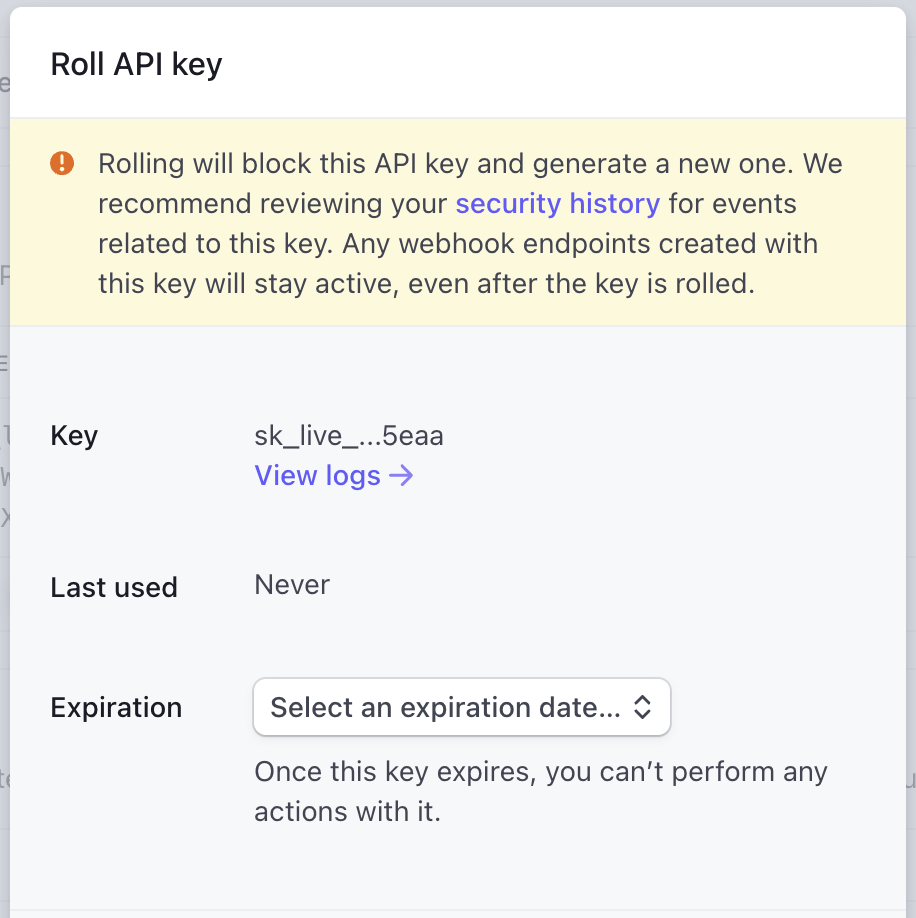
It’s critical that you allow your users to roll their API keys in case they
accidentally expose it, or just have a practice of periodically changing them
out. It’s important that this ‘roll’ function either allows for multiple keys to
exist at the same time or allows the setting of an expiry period on the previous
key, otherwise rolling the key will cause downtime for any consumers that didn’t
get the chance to plug-in the new key before the last one expired. Here’s
Stripe’s roll dialog:
In Zuplo, we allow folks to have multiple keys so they can temporarily add
another key and delete the old one as soon as they’re done with the transition.
**3/ Show the key creation date**
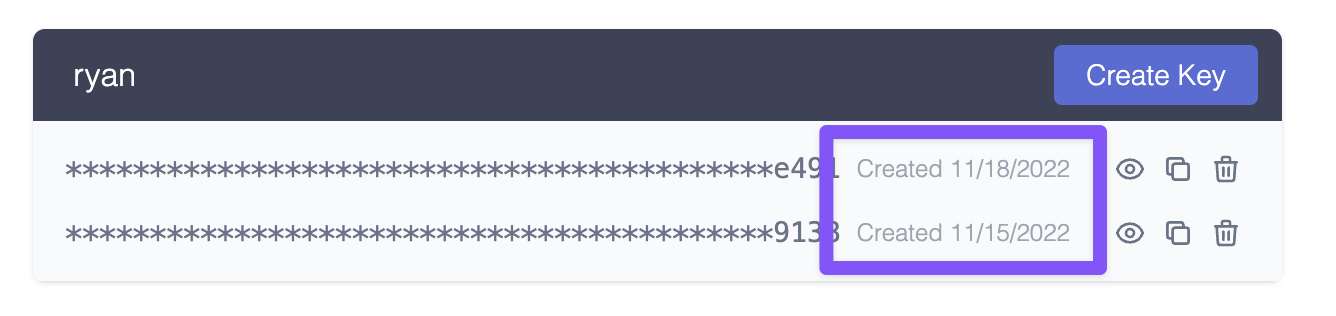
It’s important to show developers when the key was created so they can compare
the date to any potential incidents. This is especially important if you support
multiple keys so that users can differentiate between old and new.
**4/ Checksum validation**
Since checking the API key will be on the critical path of every API call, you
want to minimize latency. This is one of the reasons that you’ll want to add a
checksum to your API key. Here’s an example API key from Zuplo:
`zpka_a5c5e56x54c4437fbd6ce7dee9xxxx_63xxxx`
The last section `_631238` is a checksum that we can use to verify in the
request pipeline whether this even looks like a valid key. If not, we can simply
reject the request and avoid putting load on the API key store.
**5/ Support secret scanning**
One of the reason we have the unusual beginning of the key `"zpka_`" is so that
we could participate in programs like
[GitHub’s secret scanning](https://docs.github.com/en/code-security/secret-scanning/about-secret-scanning).
This allows us to create a regular expression that allows GitHub to inform us if
an API key is accidentally checked into a repo. Then we can automatically revoke
the key and inform its owner of the event. We also use the checksum to
double-check that it’s one of our keys before locating the service and owner.
At Zuplo, we participate in the GitHub secret scanning program so that we can
offer these services to any customer using our API-key policy.
(Aside: _Yes, the example key above triggered our secret scanning when I checked
this article into GitHub and we got notified about a token leak_ 👏😆)
**6/ Minimize latency and load on your API Key storage**
To reduce the latency on every API request, you might consider using an
in-memory cache to store keys (and any metadata read from the API Key Store). If
you have a globally distributed system, you’ll want multiple caches, one in each
location. Since Zuplo runs at the edge, we use a high-performance cache in every
data center. To increase security it's important to consider only caching the
one-way hashed version of the API-key (taking care to avoid hash-collisions by
doing a pre-hash collision check at the point of key-creation, using the same
hash algorithm).
You’ll need to choose an appropriate TTL (time-to-live) for your cache entries
which has some tradeoffs. The longer the cache, the faster your average response
time will be and less load will be placed on your API Key store - however, it
will also take longer for any revocations or changes to key metadata to work.
We recommend just a couple of minutes maximum; that’s usually plenty to keep
your latency low, a manageable load on your API Key Store, and be able to revoke
keys quickly.
If this is important to you, you might want to design a way to actively flush a
key from your cache.
**7/ Hide keys until needed**
Today, everybody has a high-quality camera in their pocket. Don’t show an API
key on-screen unless explicitly requested. Avoid the need to show keys at all by
providing a copy button. Here’s the supabase console, which almost gets full
marks, but would be even better if it provided a copy option **without** needing
me to reveal the key visually.

**8/ Attention to detail — keys need to be copied and pasted**
Sometimes it’s the little things in life; for example, try double-clicking on
**key-1** below to select it. Then try **key-2**.
key-1: `zpka-83fff45-1639-4e8d-be-122621fcd4d1`
key-2: `zpka_a5c5e56x54c4437fbd6ce7dee9xxxx_63xxxx`
Note how much easier it is to select the API key in `snake_case`?
**9/ Consider labeling your keys**
A number of services are increasingly doing this to help their customers, but
mostly to help their support teams. For example, in Stripe they have a
convention as follows:
- `sk_live_` - Secret Key, Live version
- `pk_test_` - Publishable Key, Test version
This not only supports GitHub secret key scanning above, but it can also be
invaluable to your support team when they can easily check if the customer is
using the right key in the right place. Your SDK can even enforce this to
prevent confusion.
The downside to key labeling is that if the key is found without context by a
malicious user - they can discover which services to attack. This is one
advantage of using a managed API key service that dissociates the key from any
specific API. GitHub have a great article -
[Behind GitHub’s new authentication token formats](https://github.blog/2021-04-05-behind-githubs-new-authentication-token-formats/).
## A canonical flow through an API key check
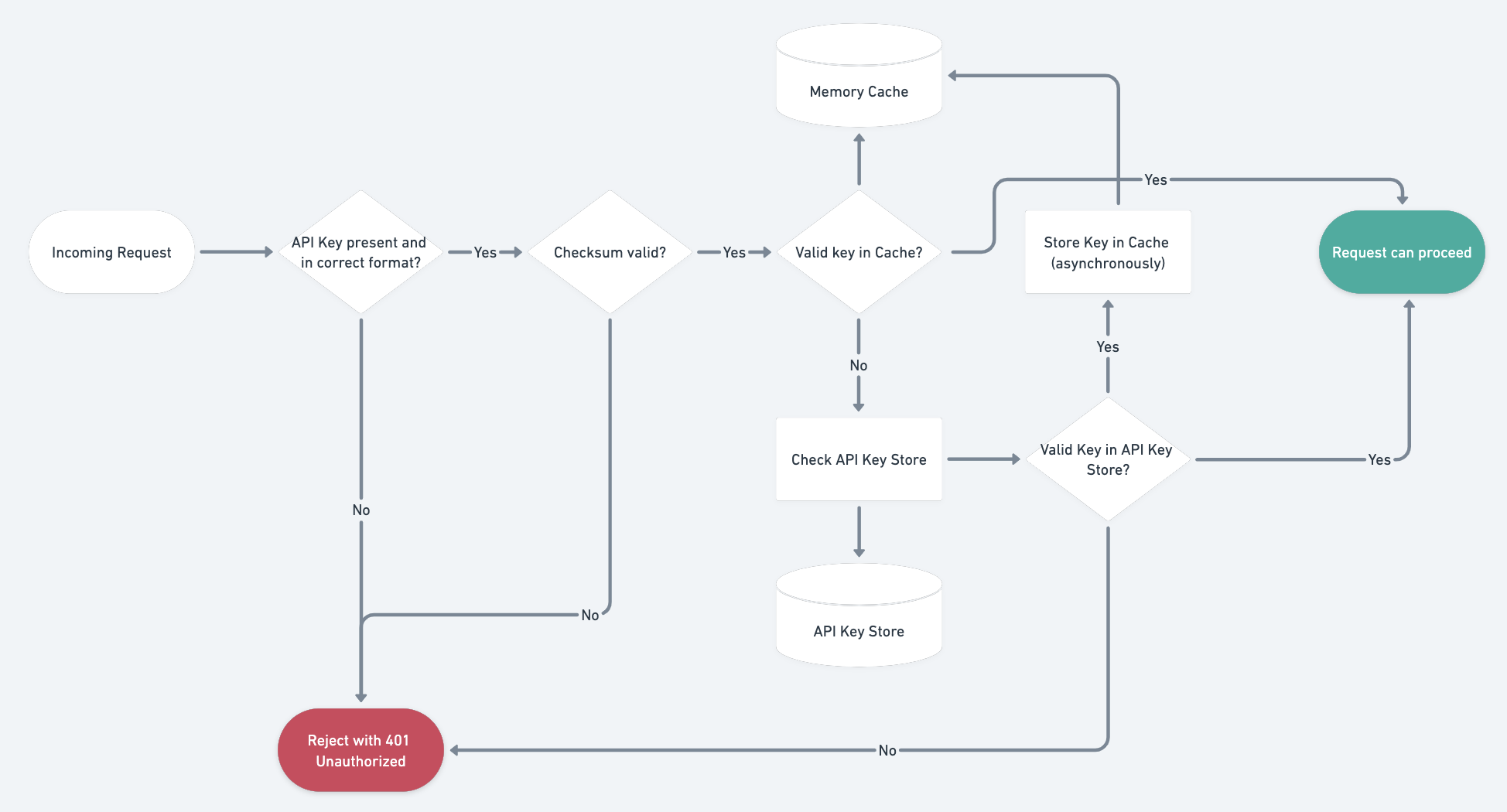
Stacking all of that together, here’s a flow chart showing the canonical
implementation of the API key check using all these practices above.
## API Key Rotation Patterns
We touched on key rolling earlier, but let's dig deeper into rotation strategies
that keep your API consumers happy while maintaining strong security posture.
Getting rotation right is one of the most impactful things you can do for the
long-term health of your API platform.
### Grace Period Rotation
The simplest rotation pattern is to issue a new key while keeping the old one
active for a defined grace period. When a consumer triggers a rotation, the
system generates a fresh key immediately but continues to honor the outgoing key
for a window — typically 24 to 72 hours. During this window the API can return a
custom header (for example `X-API-Key-Expiring: true`) on every response
authenticated with the old key, giving automated clients a machine-readable
signal to swap credentials. Once the grace period elapses, the old key is
permanently revoked. This pattern strikes a balance between urgency and
practicality: it gives teams enough time to propagate the new key through CI/CD
pipelines, environment variables, and secret managers without causing an outage.
### Multiple Active Keys
A more flexible approach is to let each consumer hold two or more active keys at
the same time. Instead of replacing one key with another, the consumer creates a
second key, deploys it wherever needed, verifies traffic is flowing on the new
key, and then deletes the old one at their own pace. This is the model Zuplo
uses: consumers can create additional keys from the developer portal, test them
in staging, and retire previous keys once the rollover is confirmed. The
advantage is that the consumer — not the platform — controls the timing, which
eliminates the risk of an expiring grace period catching someone off guard
during a holiday weekend or a deploy freeze. It also simplifies the server-side
logic because every stored key is either valid or deleted; there is no
intermediate "expiring soon" state to track.
### Automated Rotation with a Self-Service Portal
For organizations that manage dozens or hundreds of API keys, manual rotation
does not scale. A self-service developer portal can expose rotation as a
first-class workflow: consumers log in, click **Rotate**, receive the new key,
and the portal handles the grace period or multi-key transition behind the
scenes. Better yet, the portal can surface rotation reminders based on key age,
flag keys older than a policy threshold (say 90 days), and even enforce
mandatory rotation via expiration dates set at creation time. Combining this
with webhook notifications — so that a consumer's infrastructure can be alerted
programmatically when a key is about to expire — closes the loop entirely and
makes rotation a non-event rather than a fire drill.
When you pair automated rotation with an API management layer like Zuplo, you
get audit logs for every rotation event, the ability to instantly revoke
compromised keys across all edge locations, and a portal experience that your
consumers actually enjoy using. The goal is to make rotation so painless that
teams do it proactively rather than only in response to a security incident.
## Further Reading
If you want to go deeper on API key authentication and explore how it compares
to other approaches, these resources are a great next step:
- [How to Implement API Key Authentication](/learning-center/how-to-implement-api-key-authentication)
— A hands-on guide covering the end-to-end implementation of API key auth,
including code examples and integration patterns for common frameworks.
- [Top 7 API Authentication Methods Compared](/learning-center/top-7-api-authentication-methods-compared)
— A side-by-side comparison of API keys, OAuth 2.0, JWT, Basic Auth, and more,
helping you pick the right method for your use case.
## Conclusion
API keys are a great approach if you want to maximize the developer experience
of those using your API, but there are quite a few things to think about when it
comes to API key security. An alternative to building this yourself is to use an
API Management product with a gateway that does all the work for you and
includes a self-serve developer portal. Examples include Apigee, Kong, and — of
course — Zuplo.
## The Author
_Before founding Zuplo, Josh led Product for Stripe’s Payment Methods team
(responsible for the majority of Stripes payment APIs) and worked at Facebook
and Microsoft, where he founded a number of services, including Azure API
Management._
---
Updated December 4 2022 to update recommended hashing algo to sha256 based on
community feedback.