---
title: "User-level auth in your Supabase API - Supaweek Day 2"
description: "Let's see how to handle each user's request differently in your API"
canonicalUrl: "https://zuplo.com/blog/2023/09/26/handling-user-requests-dynamically"
pageType: "blog"
date: "2023-09-26"
authors: "abdallah"
tags: "Supabase, API Authentication, Tutorial"
image: "https://zuplo.com/og?text=Supaweek%20Day%202:%20User-level%20auth%20in%20your%20API"
---
In [Day 1 of the Supaweek](/blog/using-openai-and-supabase-db-to-create-an-api)
we covered how to create an AI-based API using OpenAI and Supabase DB as its
backend, and we added auth and rate-limiting using Zuplo's API Gateway and even
programmed a request handler directly in the gateway.
Today, we'll cover how to handle user requests dynamically in your API (i.e.
user-level auth) because not all users are created equal.
## User-level authentication
Putting an authentication layer to your API is essential for its security, but
it wouldn't have taken you long to start asking, how do I actually program my
API to handle different users differently?
If you were using JWT tokens, you could add claims to the token and then program
your API to handle these claims differently. But, as we saw in Day 1, Zuplo's
default authentication mechanism is API Keys, and API Keys are just short
strings opaque strings, so how do we handle different users differently?
We wrote extensively about why we chose API Keys over JWTs, one of them is our
_Wait, you're not using API
keys?_, where we covered how the best APIs in the world use API Keys. At
Zuplo, we wanted to make the use of API Keys as easy as possible, but we also
made them customizable. Let's see how in today's tutorial.
## Adding metadata to API Keys and using them in your API
We continue to build on the API we created in
Day 1, so make
sure you have it deployed and ready to go.
We will add an `orgId` to the API Key so that we can use it in our API to know
which organization the user belongs to. We will then store the `orgId` in the DB
and use it to filter the requests.
You can find a video walkthrough of this tutorial here:
### Step 1 - Add `orgId` column
In your Supabase DB, add a column `orgId` to the `blogs` table, and the
resulting schema should look like this:
```diff
id (int8)
created_at (timestamptz)
content (text)
title (text)
+ orgId (int8)
```
### Step 2 - Program the request handler
For both the `GET` and `POST` operations, we will modify the request handler to
filter the requests based on the `orgId` of the user.
For the `POST` operation, go to `generate-blog.ts` which is used as the request
handler and update the function with the following code (your `generate-blog.ts`
to look like
this sample
).
```diff
// ... stays the same
export default async function (request: ZuploRequest, context: ZuploContext) {
+ // When using the `api-key-inbound` policy (or any auth policy)
+ // Zuplo automatically adds the user's metadata to the request object
+ // so we can use it to get the orgId
+ const { orgId } = request.user?.data;
+
+ if (!orgId) {
+ // This will block the further execution of the request
+ // and return a 401 response to the client and it will not hit
+ // any other policies or the handler
+ return new Response("Unauthorized", { status: 401 });
+ }
// ... stays the same
- const savedData = await saveBlogtoDatabase(blogResult, context.log);
+ const savedData = await saveBlogtoDatabase(blogResult, orgId, context.log);
return new Response(JSON.stringify(savedData), {
headers: {
"Content-Type": "application/json; charset=utf-8",
},
});
}
type CreatedBlogSchema = {
id: number;
+ orgId: number;
title: string;
content: string;
created_at: string;
};
const saveBlogtoDatabase = async (
blog: string,
+ orgId: string,
logger: Logger
): Promise => {
try {
const { content, title } = JSON.parse(blog);
const { data, error } = await supabase
.from("blogs")
- .insert({ content, title })
+ .insert({ content, title, orgId })
.select();
if (error || data === null || data.length === 0) {
logger.error(error || "No data returned from database");
return null;
}
return data[0] as CreatedBlogSchema;
} catch (err) {
logger.error(err);
return null;
}
};
```
Notice that we're pulling the `orgId` from the API Key metadata by using
`request.user.data?.orgId`, that's because Zuplo populates the `request.user`
object to include the details of the API Key that was used to make the request
and the metadata that was added to it. If the user is not authenticated, the
`request.user` object will be `undefined`.
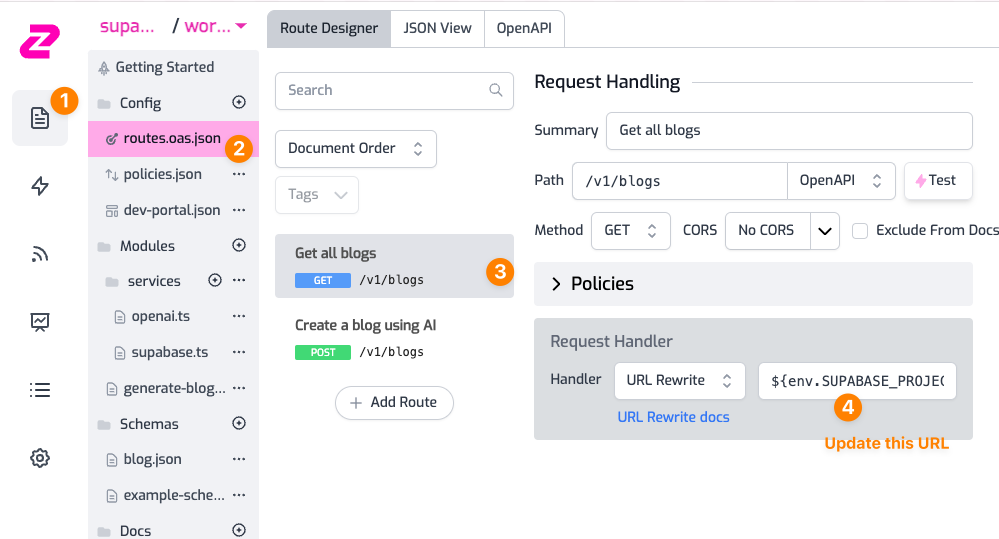
For the `GET` operation, go to the _*Request Handler*_ and update the URL to be
`${env.SUPABASE_URL}/rest/v1/blogs?orgId=eq.${request.user.data?.orgId}` as
shown below:
### Step 3 - Create an API Key with `orgId` in the metadata
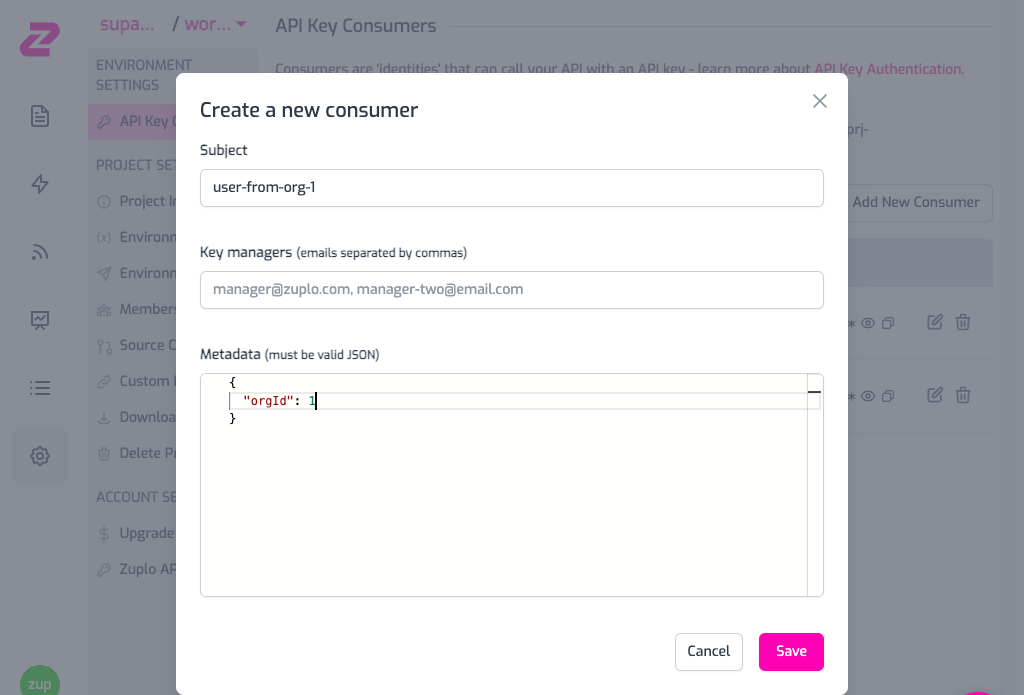
To make an authenticated request to the API, create an API Key in **_Project
Settings > API Key Consumers > Add New Consumer_**. Add the `orgId` in the API
Key metadata, you can leave the manager field empty for now.
Copy the generated API Key as we will use it in the next step.
### Step 4 - Make a request to the API!
First, create a blog using the `POST` operation from the test console.
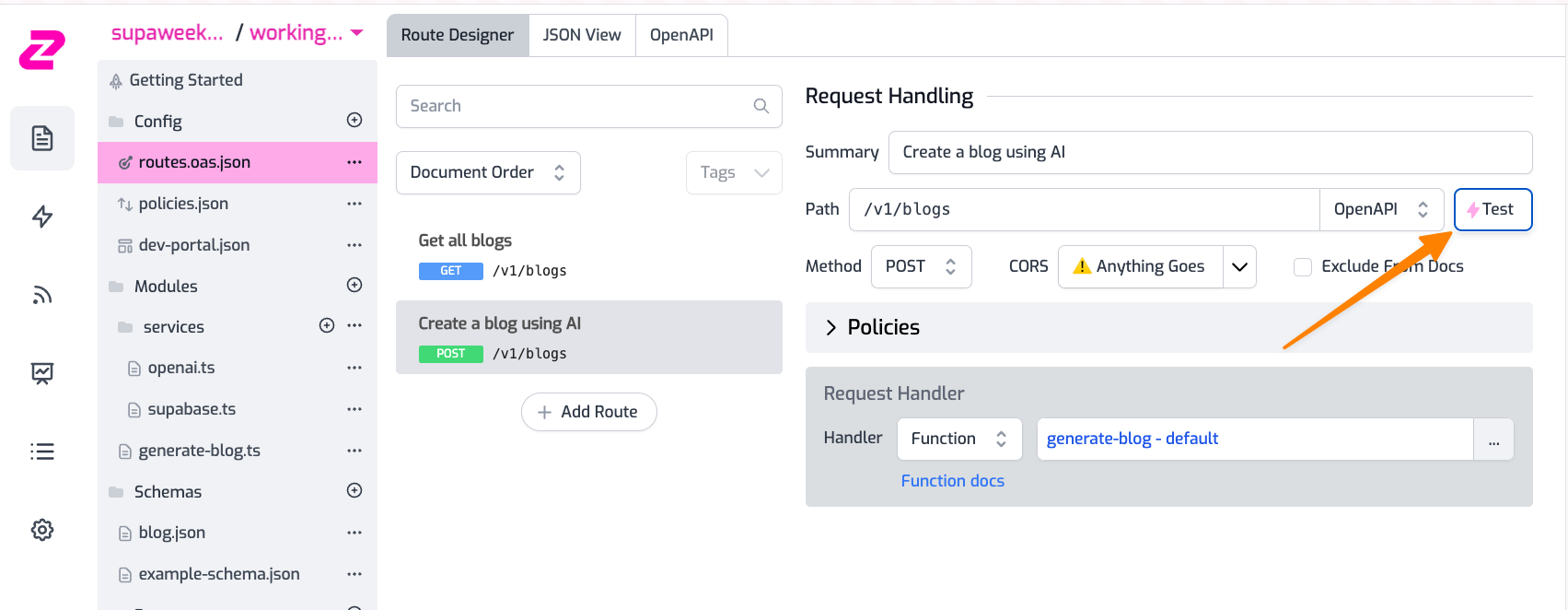
1. Add your API Key header in the format `Authorization: Bearer zpka_1234` and
make a request
2. Add the request body. This endpoint accepts a JSON in the format
`{ "topic": "you blog topic" }`. Add it to whichever topic you want OpenAI to
create the blog about.
3. Hit **_Test_**! 💥
You can now try to make the request with the `GET` operation, which will now
filter the blogs based on the `orgId` of the user.
```
[
{
"id": 2,
"orgId": 2 // <--- Notice the orgId
"created_at": "2023-09-06T18:01:12.774955+00:00",
"content": "Driving is hard.",
"title": "Exploring Different Perspectives",
},
]
```
If you now try to make a request with a different API Key with a different
`orgId`, you will get an empty array.
## This is Day 2 of Supaweek
As always if you have any questions, comments or feedback, join us in our
[Discord](https://discord.zuplo.com) server, or drop us a tweet at
[X](https://x.com/zuplo). We'd love to hear from you!
Check out [Day 3 of the Supaweek](/blog/documentation-for-your-supabase-api) to
learn about the API Documentation that's generated with your Zuplo API!