---
title: "How to version an API"
description: "Learn the best way to manage different versions of your API, and how companies like Github still get it wrong."
canonicalUrl: "https://zuplo.com/blog/2022/05/17/how-to-version-an-api"
pageType: "blog"
date: "2022-05-17"
authors: "josh"
tags: "API Versioning, API Best Practices"
image: "https://zuplo.com/og?text=How%20to%20version%20an%20API"
---
At some point, you’re going to make an update to your API that would break
existing clients if they don’t change their code. That’s OK, change happens.
However, it is critical that you give yourself the option to do two things when
this situation arises:
1. Support multiple versions of your API simultaneously (so that you can give
older clients the opportunity to migrate to your latest version).
2. Inform a client that the version they have coded for is no longer supported
Life is much easier if you think about versioning from the beginning of the
lifecycle of your API. A key decision to make is how you want to design
versioning into your API; that is, how should the client communicate the version
of the API they are coded to work with?
## Table of Contents
1. [API Versioning Methods](#api-versioning-methods)
2. [API Versioning Guidelines](#api-versioning-guidelines)
3. [Common Version Management Mistakes](#common-version-management-mistakes)
4. [Our Recommendations](#our-recommendations)
5. [Wrapping Up](#wrapping-up)
## API Versioning Methods
API versioning can be handled in several ways, each with its own strengths and
scenarios where it works best. Fundamentally, there are two primary options:
1. **URL-based versioning** - where the version is encoded directly in the URL,
e.g. `/v1/charges`. This is the most common approach and is used by most
large API-first companies like Stripe, Twilio, SendGrid and Airtable. You
could also include the version as a query param (less-common) which we
explore later in the article.
2. **Header-based versioning** - where the version is in a header; either a
customer header like `api-version: v3` or as part of the accept header, e.g.
`accept: application/vnd.example+json;version=1.0`.
Here's a further breakdown of the main methods developers use to manage API
versions.
### URL Path Versioning
This method places the version directly in the URL, making it easy to spot and
understand.
Example:
```
https://api.example.com/v1/users
https://api.example.com/v2/users
```
It's simple and clear, making it a popular choice for many public APIs. The
version is always visible in the URL, which helps with debugging and
understanding the API structure.
### Query Parameter Versioning
In this approach, the version is added as a query parameter in the URL. This
keeps the base URL clean while still allowing flexibility.
Example:
```
https://api.example.com/users?version=1
https://api.example.com/users?version=2
```
This method works well for maintaining backward compatibility and handling
default versions, though it can sometimes be less obvious in logs or
documentation. It's also not obvious to users what version of the API they are
using. We recommend that versions should be a mandatory field, and query params
are not the right fit for that in our opinion.
### Custom Header Versioning
Here, the API version is specified in the HTTP headers, separating it from the
URL entirely.
Example:
```
GET /users
Api-Version: 2023-01-01
```
This approach keeps URLs clean and aligns with HTTP standards. However, it
requires additional handling for custom headers, making it slightly more
complex.
### Content Type Versioning
This method uses HTTP content negotiation, embedding the version in the media
type.
Example:
```
Accept: application/vnd.company.api-v1+json
Accept: application/vnd.company.api-v2+json
```
It integrates versioning into the content type, adhering to REST and HTTP
standards. While powerful, it can be more challenging to implement and
understand.
### Method Comparison
| Versioning Method | Pros | Cons | Best For |
| ----------------- | -------------------------------------------------------------------- | -------------------------------------------------------------------- | --------------------------------------------- |
| URL Path | \- Easy to identify
\- Debug-friendly
\- Cache-efficient | \- Adds clutter to URLs
\- Requires URL changes for updates | Public APIs with long-term support |
| Query Parameter | \- Simple to implement
\- Flexible for default versions | \- Not always visible in logs
\- Easy to miss in documentation | Internal APIs or quick iterations |
| Custom Header | \- Clean URLs
\- Aligns with HTTP standards | \- Less obvious
\- Needs custom header handling | APIs needing more advanced versioning |
| Content Type | \- REST-friendly
\- Built into content negotiation | \- Complex setup
\- Steeper learning curve | Enterprise APIs with strict REST requirements |
The best versioning method depends on factors like client requirements,
infrastructure, and maintenance needs. While URL path versioning is widely used
for its simplicity, header-based methods are gaining traction for their cleaner
and more flexible approach.
## API Versioning Guidelines
### Using Semantic Versioning
This is more applicable to Header based versioning. Semantic versioning follows
the **MAJOR.MINOR.PATCH** format:
- **MAJOR**: Introduces breaking changes that require clients to update.
- **MINOR**: Adds new features while staying compatible with previous versions.
- **PATCH**: Fixes bugs or makes minor updates without affecting compatibility.
For instance, adding an optional field would move the version from 1.2.0 to
1.3.0. However, changing a field type (e.g., from string to integer) would
require a major version bump, like 1.3.0 to 2.0.0.
It’s also essential to establish clear policies for supporting older API
versions. Check out our
[full guide to semantic versioning](/learning-center/semantic-api-versioning)
for more info.
### Supporting Old Versions
A well-defined version support policy should address:
- How long each version will be supported
- A grace period for clients to migrate
- Assistance during the migration process
A common approach is the **N-2 support policy**, where you maintain the current
version and the two prior major versions.
### Version Documentation
For each API version, ensure the following documentation is available:
1. **Changelog Management**
Maintain changelogs that clearly outline:
- Breaking changes
- New features
- Deprecation notices
- Bug fixes
2. **Version-Specific Documentation**
Provide details such as:
- Endpoint specifications
- Request and response formats
- Authentication details
- Examples of usage
3. **Migration Guides**
Help clients transition smoothly with:
- Code samples
- Step-by-step migration instructions
- Explanations of common issues and solutions
### Version Deprecation
We already have an
[API deprecation guide](/learning-center/deprecating-rest-apis) - but here's an
abridged version of the process
| Phase | Duration | Actions |
| -------------- | --------------- | ------------------------------------------------ |
| Announcement | 6 months before | Notify users about the upcoming deprecation |
| Warning Period | 3 months | Display deprecation warnings |
| Grace Period | 3 months | Keep the deprecated version with limited support |
| End-of-Life | Final date | Shut down the deprecated version entirely |
### Managing Version Lifecycles
Effective lifecycle management ensures your API remains reliable and efficient.
1. **Version Tracking**
Use tools or automation to monitor:
- Active versions in use
- Usage trends for each version
- Error rates by version
- Progress of client migrations
2. **Communication Strategy**
Keep users informed with:
- Regular updates on version status
- Migration deadlines
- Availability of technical support
- Final sunset dates for older versions
3. **Support Tools**
Build infrastructure to handle:
- Hosting multiple versions simultaneously
- Monitoring traffic by version
- Automating deprecation warnings
- Handling errors specific to each version
Balancing updates with reliable support is key to successful API versioning.
While introducing new features, ensure existing clients have the tools and time
they need to transition smoothly.
## Common Version Management Mistakes
Keeping outdated API versions alive can drain your resources, increase costs,
and open the door to security risks. It can also hurt API performance and make
the user experience worse due to poor resource management and added complexity.
### Outdated Version Support
Continuing to support old API versions can cause several problems:
- Security risks from legacy versions
- Higher maintenance expenses
- Slower performance due to inefficient resource use
- Accumulation of technical debt
To avoid these issues, take steps to phase out older versions (aka
[Sunset](./2025-08-17-how-to-sunset-an-api.md)):
- **Set clear
[deprecation timelines](/learning-center/http-deprecation-header)**: Announce
when features will stop being updated, when only security patches will be
provided, and when the version will be fully retired.
- **Track usage data**: Monitor adoption rates to determine the right time to
deprecate a version.
- **Encourage migration**: Show users the benefits of upgrading, like improved
performance or new features, and provide support to make the transition
easier.
These practices can help simplify your API management and keep your system
running smoothly. You can find more tips in our guide to
[migrating users off old API versions](/learning-center/how-to-get-clients-to-move-off-old-version-of-api).
## Our recommendations
### 1/ Keep those options open
First and foremost, we **strongly recommend** that you make the version a
mandatory part of all requests received by your API. So any request that doesn’t
include the version should receive a 4xx error code (400 if it’s a required
header, 404 if it is missing from the URL).
This is the most important decision because it means you always have both
options outlined at the opening of this post.
### 2/ Keep it simple
After this, we recommend URL-based versioning. There is plenty of precedent in
the market and it’s the easiest for developers to use - it’s easier to test with
CURL, call with fetch, test in a browser if you support GET requests. It’s just
easier.
### 3/ Use headers if you’re passionate about building a _pure_ REST implementation
The primary reason to use headers over URL-based versioning is to avoid
violating a REST principle that states a URI should refer to a unique resource
(`v1/foo` and `v2/foo` could theoretically point to the same resource). However,
such pure implementations of REST APIs have not proven popular and are trickier
for developers to use.
### 4/ Don’t break rule 1
There are examples of APIs in the public domain that have a default version if
the client doesn’t specify a version. Here’s GitHub’s documentation on their
API:
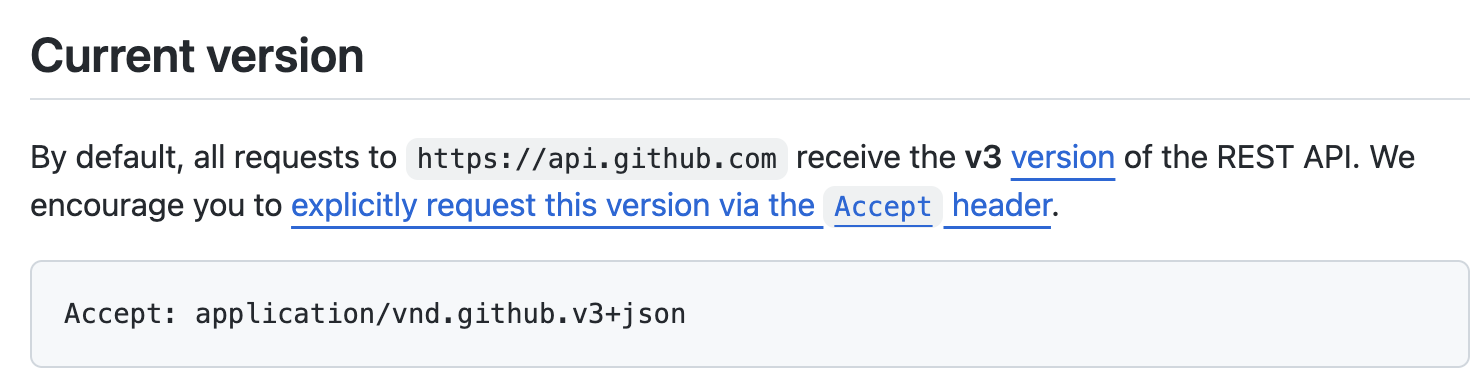
Even though it encourages developers to use the version header, the API still
works without it and just assumes v3. We think this is a mistake; if GitHub
upgrades to v4 and that becomes the new default, all of those old clients that
didn’t follow the best practice will experience unpredictable behavior and
strange errors.
## Wrapping Up
Whether you choose to use URI or Header based versioning - many of the same core
principles apply on how you should actually go about
[deprecating an old version](/learning-center/deprecating-rest-apis) and
[migrating users to a new version](/learning-center/how-to-get-clients-to-move-off-old-version-of-api).
Our preferred method is path versioning, as it makes your consumer's life easier
(although we support both in Zuplo).
If you're looking to make managing your API's lifecycle easier, with built-in
tools for versioning, monitoring, changelogs, and deprecation - you should
[check out Zuplo](https://portal.zuplo.com/signup?utm_source=blog).