---
title: "Providing Secure Access to Databases for LLMs and AI-Agents"
description: "Learn about CentralMind a universal MCP-Server for your Databases optimized for LLMs and AI-Agents."
canonicalUrl: "https://zuplo.com/blog/2025/04/30/secure-database-access-for-llms-and-agents"
pageType: "blog"
date: "2025-04-30"
authors: "viktor"
tags: "Model Context Protocol, API Tooling, Tutorial"
image: "https://cdn.zuplo.com/cdn-cgi/image/fit=crop,width=1200,height=630/www/media/posts/2025-04-30-secure-database-access-for-llms-and-agents/image.png"
---
> This article is written by [Victor Kiselev](https://github.com/Gaploid),
> creator of [CentralMind](https://github.com/centralmind/gateway). All opinions
> expressed are their own.
With the rise of AI-Agent and MCP (Model-Context-Protocol) hype this year, many
new services, applications, and companies are building AI agents for various
scenarios and tasks. Developer-AI-Agents, Support-AI-Agents, and even AI agents
for loan approvals are becoming common. However, one major obstacle arises when
integrating these services into your company: **access to up-to-date data**.

## Data Access Pain Points
For the past three years, I was the Head of Product responsible for building an
analytical platform based on open-source technologies like ClickHouse, Apache
Kafka, and others. Like many, we started adding AI features to our platform and
immediately faced concerns from users who found it hard to convince their
company to adopt AI features due to security and compliance concerns.
Even AI companies hesitate to use AI services internally due to data-sharing
risks with third-party providers. The main concerns are:
- **Compliance Teams** – Risk of GDPR and PII data leaks to third-party
companies.
- **Legal Teams** – The need to update and revise customer agreements due to
third-party service usage.
- **Security Teams** – Fear that AI chatbots may elevate user permissions and
grant access to restricted data.
- **Data Teams** – Lack of resources or time to provide secure data access for
AI services requested by business departments.
Even if your AI service provides business value, it may still be blocked by
these departments.
## How Companies Are Trying to Solve This Problem
The most obvious approach is to ask the Data team or someone responsible for
data to provide **SQL access** to tables or views in databases. However, this
method often leads to:
- **Networking Security Issues** – The database must be accessible to
third-party or internal AI applications.
- **Role-Based Permissions** – AI applications need to impersonate users or
implement Row-Level Security (RLS).
- **Performance Risks** – Poorly written SQL queries from AI chatbots can
degrade database performance.
Another approach is **exporting subsets of data to object storage** (e.g., S3)
in Parquet or CSV format. This method allows for:
- PII and sensitive data filtering during export.
- Access control via object storage permissions.
However, this approach **fails** when real-time data access is required. For
example:
- A **retail webshop** integrating a customer support chatbot cannot provide
real-time order statuses, refunds, or modifications if data is outdated.
- A **logistics company** using AI-powered fleet optimization cannot adjust
delivery schedules in real-time if route and traffic data are outdated.
- A **financial trading platform** leveraging AI for market insights cannot
provide accurate predictions if stock prices and transactions are delayed.
The best and most common solution is to build an API layer between your data and
the AI application to decouple the logic of accessing data from the data itself.
This API layer ideally should:
1. Be understandable for LLMs, have enough metadata and examples
2. Contain a predefined list of operations with verified SQL queries
3. Implement authentication
4. Include caching and be able to scale
5. Provide observability, auditing, and monitoring
However, developing such an API requires time and engineering resources.
## Are There Tools That Could Help?
Most developers or data engineers initially consider tools like Cursor or
Windsurf, which generate boilerplate API code on top of a database. While
effective in some cases, making this code production-ready still requires days
to weeks of work, especially if you need to implement requirements like
authentication, telemetry, auditing, etc.
Another approach is to use a simple MCP (Model-Context-Protocol) server as a
bridge between data and AI. There are a bunch of them, including open-source
ones, but most of them give raw SQL access to your data, allowing an LLM,
through the MCP server, to execute arbitrary SQL queries. This is fine for some
scenarios, like analytics or development. But in more regulated companies, that
could be a blocker due to the wide permissions granted to LLMs in that case.
That's why we built an **open-source tool** –
[CentralMind Gateway](https://github.com/centralmind/gateway), which
**automatically generates APIs using AI**. The tool connects to your database,
analyzes table/view schemas and sample data, and generates ready-to-use APIs
with minimal effort. It can be represented as an MCP or OpenAPI endpoint, with a
fixed list of API endpoints or with raw/direct SQL access if needed during
development.

### Key Features of Gateway:
- ⚡ **Automatic API Generation** – Creates APIs automatically using LLM based
on table schema and sampled data
- 🗄️ **Structured Database Support** – Supports
PostgreSQL,
MySQL,
ClickHouse,
Snowflake,
MSSQL,
BigQuery,
Oracle Database,
SQLite,
ElasticSearch,
DuckDB
- 🌍 **Multiple Protocol Support** – Provides APIs as REST or MCP Server
including stdio and SSE mode
- 🔒 **PII Protection** – Implements
regex plugin or
Microsoft Presidio plugin
for PII and sensitive data redaction
- 📦 **Local & On-Premises** – Support for
self-hosted LLMs
through configurable AI endpoints and models
- 🔐 **Authentication Options** – Built-in support for
API keys and
OAuth
- 👀 **Comprehensive Monitoring** – Integration with
OpenTelemetry (OTel)
for request tracking and audit trails
## Quick Start: Simple MCP Server on top of your Database
To start a simple MCP Server with Direct or Raw SQL access just execute the
command below. Make sure that your database is accessible.
```bash
docker run --platform linux/amd64 -p 9090:9090 \
ghcr.io/centralmind/gateway:v0.2.14 start \
--connection-string 'postgres://db-user:db-password@db-host/db-name?sslmode=require'
```
After that you should see output with endpoints for MCP and REST at the same
time in your console:
```
INFO Gateway server started successfully!
INFO MCP SSE server for AI agents is running at: http://localhost:9090/sse
INFO REST API with Swagger UI is available at: http://localhost:9090/
```
## MCP Server with pre-defined SQL Queries
To create API or tools in MCP more controllable from security and compliance you
can pre-create API methods and SQL queries using the `Discovery` process that's
integrated into the `gateway` tool.
### Step 1: Download Gateway Binaries
```bash
wget https://github.com/centralmind/gateway/releases/download/v0.2.14/gateway-linux-amd64.tar.gz
tar -xzf gateway-linux-amd64.tar.gz
mv gateway-linux-amd64 gateway
chmod +x gateway
```
Windows (Intel)
```powershell
# Download the latest binary for Windows
Invoke-WebRequest -Uri https://github.com/centralmind/gateway/releases/download/v0.2.14/gateway-windows-amd64.zip -OutFile gateway-windows.zip
# Extract the archive
Expand-Archive -Path gateway-windows.zip -DestinationPath .
# Rename
Rename-Item -Path "gateway-windows-amd64.exe" -NewName "gateway.exe"
```
macOS (Intel)
```bash
# Download the latest binary for macOS (Intel)
curl -LO https://github.com/centralmind/gateway/releases/download/v0.2.14/gateway-darwin-amd64.tar.gz
# Extract the archive
tar -xzf gateway-darwin-amd64.tar.gz
mv gateway-darwin-amd64 gateway
# Make the binary executable
chmod +x gateway
```
macOS (Apple Silicon)
```bash
# Download the latest binary for macOS (Apple Silicon)
curl -LO https://github.com/centralmind/gateway/releases/download/v0.2.14/gateway-darwin-arm64.tar.gz
# Extract the archive
tar -xzf gateway-darwin-arm64.tar.gz mv gateway-darwin-arm64 gateway
# Make the binary executable
chmod +x gateway
````
### Step 2: Set an AI API Key
Since Gateway uses AI in the Discovery stage to analyze schemas and generate API specifications, you need an API key from **OpenAI, Claude, Google Gemini**, or [other supported providers](https://docs.centralmind.ai/providers/).
The easiest way is to use Google Gemini that offers a **free-tier API key** (no credit card required) via [Google AI Studio](https://aistudio.google.com/apikey).
```bash
export GEMINI_API_KEY='yourkey'
````
### Step 3: Start the Discovery Process
```bash
./gateway discover \
--ai-provider gemini \
--connection-string 'postgres://db-user:db-password@db-host/db-name?sslmode=require' \
--prompt 'Develop an API that enables a chatbot to retrieve information about my data. Think like an analyst and determine useful API methods.'
```
### Step 4: Review & Launch the API Server
After discovery, the `gateway.yaml` file is generated with all API
configurations. You can review, adjust, and add **plugins** if necessary.
```bash
./gateway start --config gateway.yaml --raw=false
```
- **MCP Server Address:** `http://localhost:9090/sse`
- **OpenAPI Server Address:** `http://localhost:9090`
- **Swagger Documentation:** `http://localhost:9090/swagger/`
The whole process takes **1-5 minutes**, depending on database complexity and
should look like this:

## How to Integrate Your Generated API with AI Agents
To integrate with AI Agents, you can use the OpenAPI spec available in Swagger
documentation UI and add the API as an `action` in
[ChatGPT](https://docs.centralmind.ai/docs/content/integration/chatgpt/), but
don't forget to publish your newly created API somewhere to make it available
publicly. Database Gateway also supports **MCP** and **MCP SSE** modes, enabling
seamless integration with clients like **Cursor** and **Claude Desktop** via
stdio. Check out the
[Cursor integration guide](https://docs.centralmind.ai/docs/content/integration/cursor/).
Below, I'll demonstrate how easy it is to use the generated API as a tool with
LangChain using the Python SDK.
```bash
# Install LangChain and related packages
pip install langchain langchain-openai mcp_use
```
Below is a quick example of how to add an external API as a tool and build
complex AI-Agents. Don't forget to set the `OPENAI_API_KEY` env variable with
your key.
```python
import os
import asyncio
from dotenv import load_dotenv
from langchain_openai import ChatOpenAI
from mcp_use import MCPAgent, MCPClient
# Store the endpoint URL in an environment variable
MCP_SERVER_URL = "http://localhost:9090/sse"
async def main():
load_dotenv()
config = {
"mcpServers": {
"http": {
"url": MCP_SERVER_URL
}
}
}
client = MCPClient.from_dict(config)
llm = ChatOpenAI(model="gpt-4o")
agent = MCPAgent(llm=llm, client=client, max_steps=30)
result = await agent.run(
"Could you analyze my data?",
max_steps=30,
)
print(result)
if __name__ == "__main__":
asyncio.run(main())
```
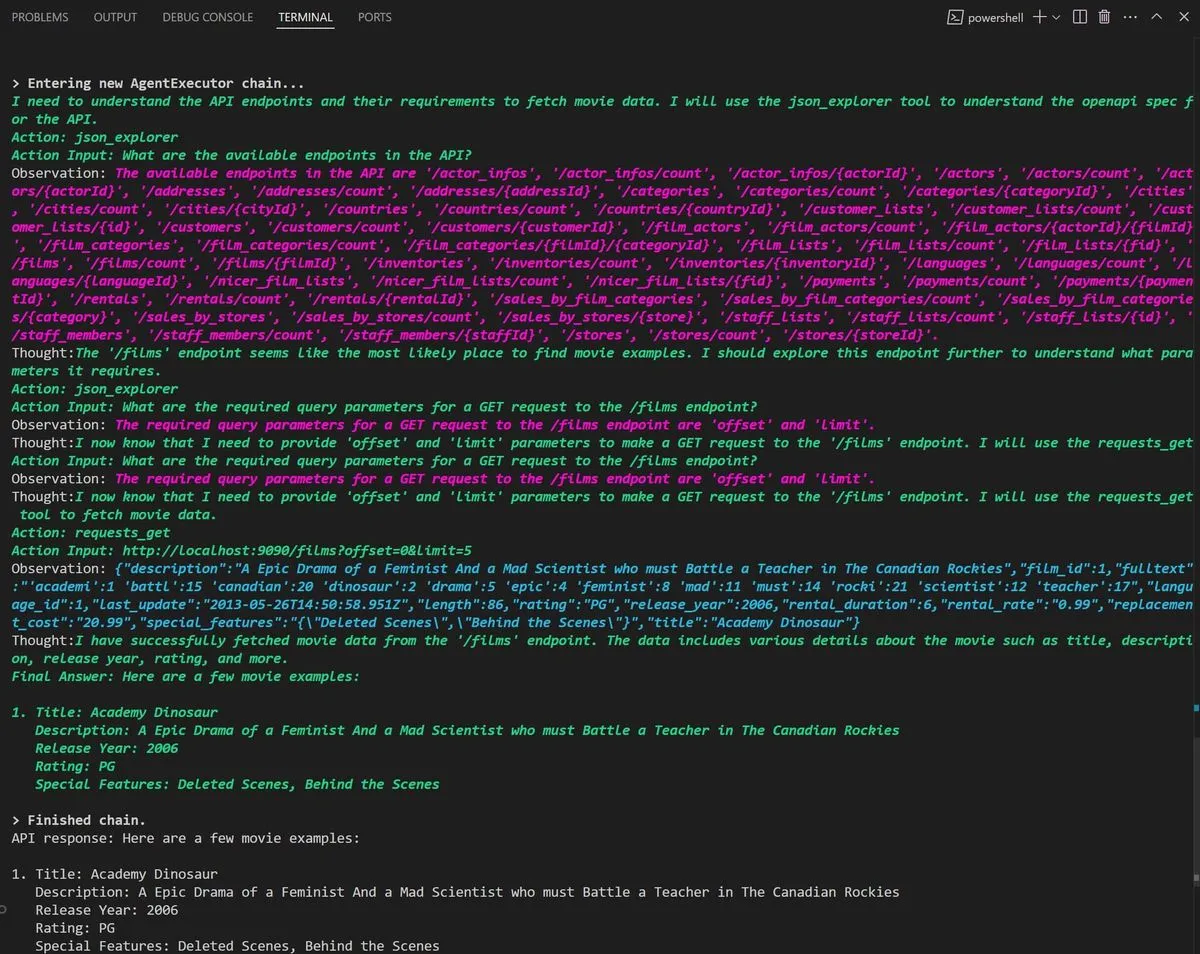
As a result, LangChain will do a chain of requests to ChatGPT and you should see
something like this as the output:
## Final Words
Do not waste time building APIs or MCP servers manually! If you're working on an
MVP or pilot project for a new AI Agent, Gateway can help you create secure,
compliant, and auditable APIs **in minutes instead of days**.
- **Try a Web Demo:** [https://centralmind.ai](https://centralmind.ai)
- **GitHub Repository:**
[https://github.com/centralmind/gateway](https://github.com/centralmind/gateway)
- **Documentation:**
[https://docs.centralmind.ai/](https://docs.centralmind.ai/)