---
title: "Using Supabase and OpenAI to create an API - Supaweek Day 1"
description: "The first day of the Supaweek will start with a production-ready API using OpenAI"
canonicalUrl: "https://zuplo.com/blog/2023/09/25/using-openai-and-supabase-db-to-create-an-api"
pageType: "blog"
date: "2023-09-25"
authors: "abdallah"
tags: "OpenAI, Supabase, Tutorial"
image: "https://zuplo.com/og?text=Supaweek%20Day%201:%20Using%20Supabase%20DB%20and%20OpenAI%20to%20create%20an%20API"
---
Supabase is an amazing platform for building applications that scale to millions
of users yet handle complex scenarios, while still keeping a great Developer
Experience (DX). We love great DX and we think it's time we show you how to
build an API (using AI of course) with the Supabase platform and Zuplo, in
minutes.
This is why we're launching the Supaweek, an entire week of content to show you
how to build a production-ready API backed by Supabase, OpenAI, and Zuplo. We'll
be releasing new content each day, so make sure to come back to check it out!
## What are we building during the Supaweek?
We will create an API that generates a blog post based on a topic and saves it
in a Supabase DB. The API will have a single path `/v1/blogs` that accepts a
`POST` method to generate an AI-based blog post using OpenAI and save the result
in a Supabase DB.
We will then add authentication so that only authorized users can access it, and
rate limiting to control the number of requests per user.
Over this week we'll be building up features with this API - so, let's start
with today's goal, shall we?
Here's a video walkthrough of the steps below:
### Step 1 - Create a Supabase DB and table
If you haven't already, create a new project in Supabase and create a table
named `blogs` with the following columns:
```
id (int8)
created_at (timestamptz)
content (text)
title (text)
```
### Step 2 - Deploy your Zuplo API
Here's the repository
that contains the configuration we need to create the API. here.
You can deploy it to Zuplo by clicking on the button below:
 ### Step 3 - Add the required environment variables
In **_Project Settings > Environment Variables_** add the following API Keys
with your own values:
```
OPENAI_API_KEY=
SUPABASE_URL=
SUPABASE_SERVICE_ROLE_KEY=
```
### Step 4 - Explore the existing routes
Click on **_File > routes.oas.json > Create a blog using AI_** and you'll see
the route `/v1/blogs` with the `POST` method. If you now click on Policies,
you'll see the following:
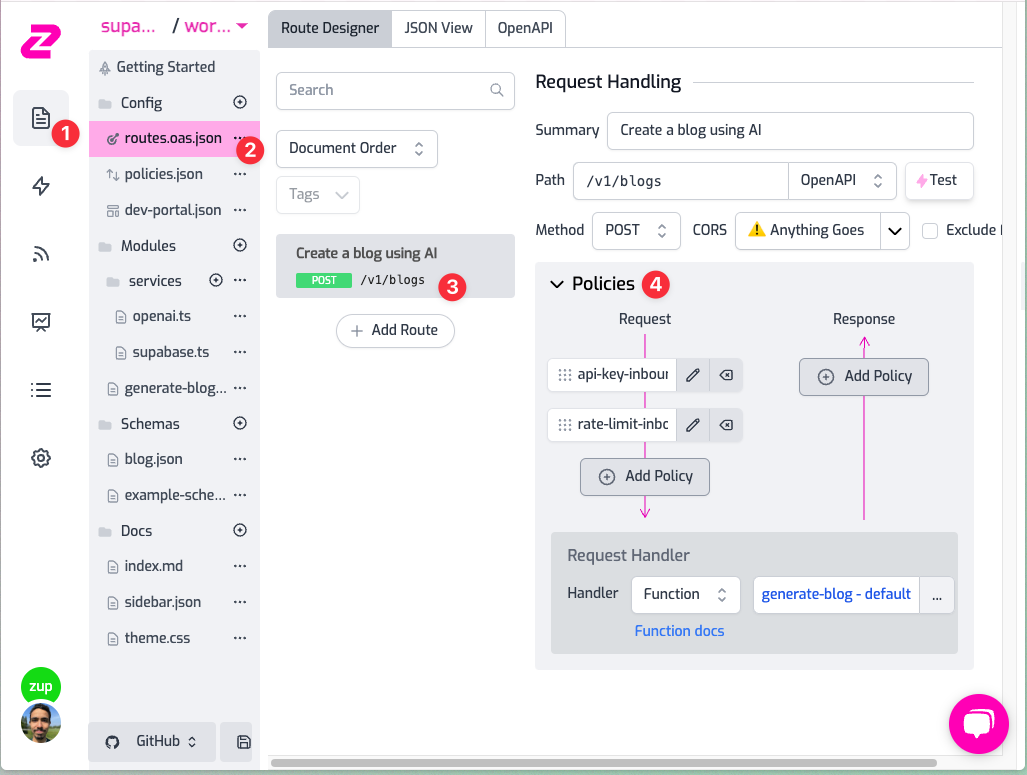
This is the flow of any request that goes from your gateway to the backend:
1. The request will first hit the **_api-key-inbound_** policy: this means that
unauthenticated requests will be rejected with a 401 (and a beautiful error
message)
2. It will then go through the **_rate-limit-inbound_** policy, if you click on
it you will see that it is configured to only accept 10 requests per minute
per user. How does it know about the user? Because they're using an API Key
it automatically understands how to block the request.
3. The request will now go to the **_Request handler_** (i.e. the backend). In
this case it's a _Function Handler_, a programmable handler of Zuplo. If you
**Click on `generate-blog`**, and you'll see the code for handling the `POST`
requests using OpenAI to generate a blog post and save it into your Suabase
DB.
### Step 5 - Create an API Key
To make an authenticated request to the API, create an API Key in **_Project
Settings > API Key Consumers > Add New Consumer_**. You can leave the metadata
and manager fields as they are for now.
Once you have created the API Key, copy it as we will use it in the next step.
### Step 6 - Make a request to the API!
Now that you're all set create a blog using the `POST` method on `/v1/blogs`.
You can make requests using the test console (similar to Postman) which you can
find by clicking on the route as follows:
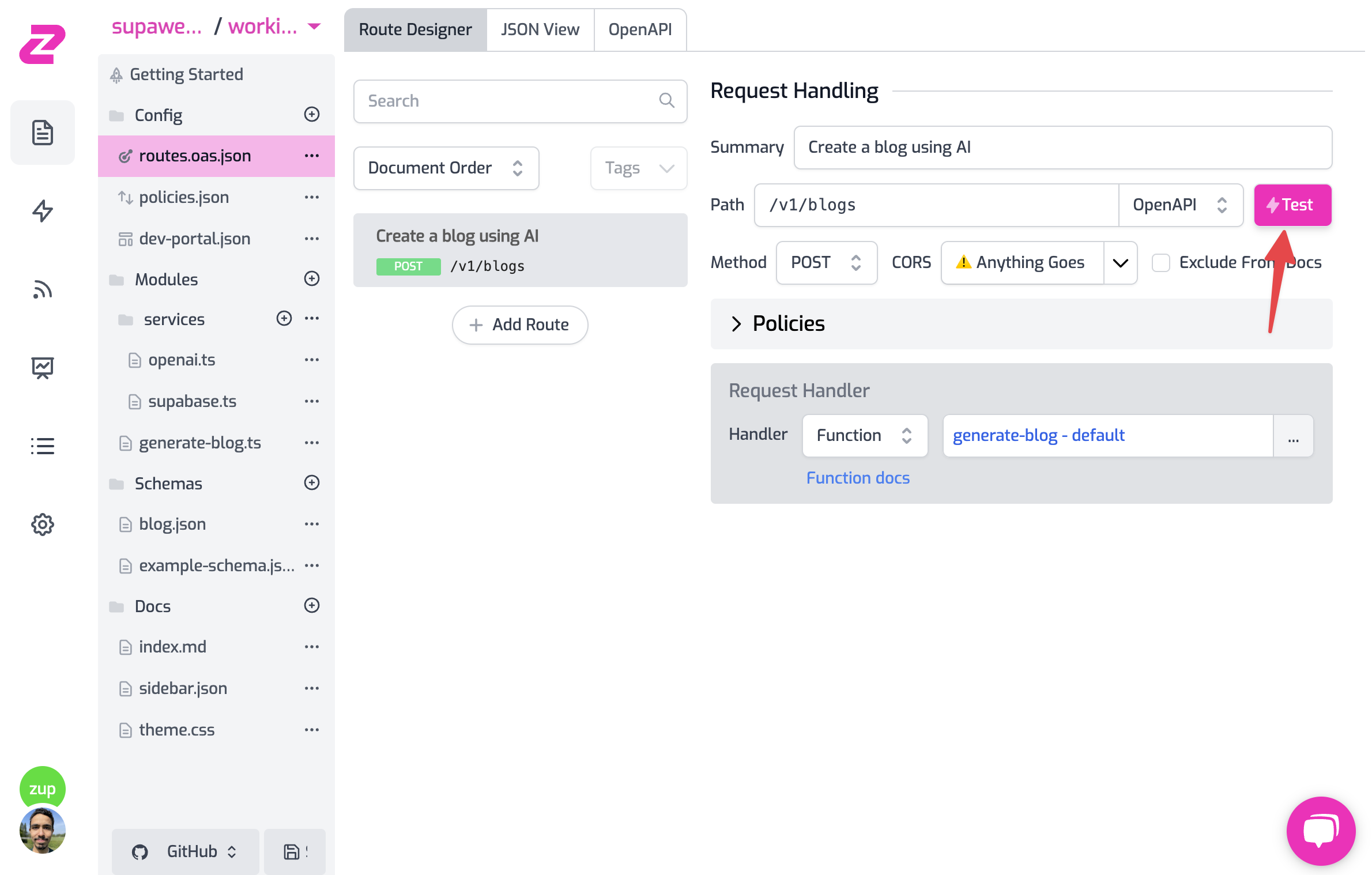
1. Add your API Key header in the format `Authorization: Bearer zpka_1234` and
make a request
2. Add the request body. This endpoint accepts a JSON in the format
`{ "topic": "you blog topic" }`. Add it to whichever topic you want OpenAI to
create the blog about.
3. Hit **_Test_**! 💥
Now you have a ready API, with Auth, rate limiting, and using some of the best
services like OpenAI to spice up your API with AI and Supabase DB with a
programmable layer to access your data.
### Step 7 - Add a `GET` route to get all blogs
#### 1. Create the `GET` route
Click on **_File > routes.oas.json > Add Route_**. Configure the route as
follows:
```
Description: Get all blogs
Path: /v1/blogs
Method: GET
```
If you click on _Save all_ and then test the route, by default, you will see
that it returns the request that's forwarded to `https://echo.zuplo.io`, which
is a service that echoes back the request. This is because we haven't configured
the route to do anything yet.
#### 2. Configure the Request Handler
Let's change the request handler to return the blogs from the Supabase DB. Click
on the route and then on the `GET` operation. You'll see that the request
handler is set to `https://echo.zuplo.io`.
Change the handler to `URL Rewrite`, which hits the configured URL without
passing any of the original request path or query parameters. Then, change the
URL to your Supabase DB URL: `${env.SUPABASE_URL}/rest/v1/blogs`, this is
because
Supabase exposes their DB in a RESTful API
so you can access it conveniently.
If you click on _Save all_ and then test the route, you'll have an error from
Supabase saying that you're not authorized to access the DB:
```
{
"message": "No API key found in request",
"hint": "No `apikey` request header or url param was found."
}
```
In the next step, we will add the necessary headers to make the request
authorized. The headers will be added by Zuplo, so only the Gateway can access
the DB but not the user.
#### 3. Add the Supabase headers
In the route's request path, click on _**Add Policy**_ and search of **_Add or
Set Request Headers_**, click on the policy to add it to the route and configure
it as follows, which will add the headers `apikey` and `Authorization` and
configure them with the Supabase Service Role Key which is needed by Supabase to
authorize the request:
```json
{
"export": "SetHeadersInboundPolicy",
"module": "$import(@zuplo/runtime)",
"options": {
"headers": [
{
"name": "apikey",
"value": "$env(SUPABASE_SERVICE_ROLE_KEY)",
"overwrite": true
},
{
"name": "Authorization",
"value": "Bearer $env(SUPABASE_SERVICE_ROLE_KEY)",
"overwrite": true
}
]
}
}
```
Now save the configuration and test the route. You should see the blogs from the
DB! But the route is not secure and anyone can access it. Let's add
authentication to it.
#### 4. Add authentication to the route
Click on _**Add Policy**_ again and now select from the top the
`api-key-inbound` policy from the **Existing** policies list.
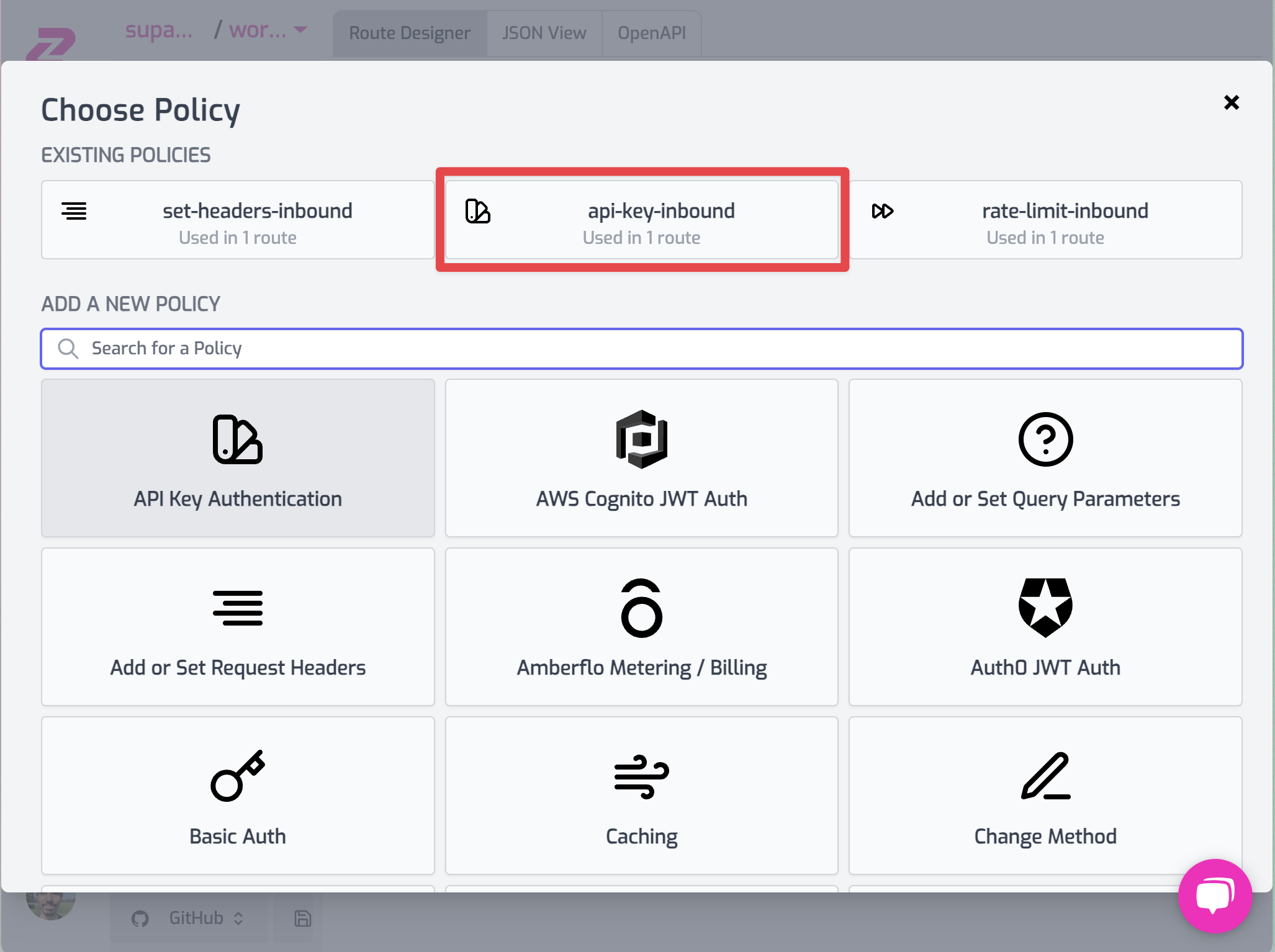
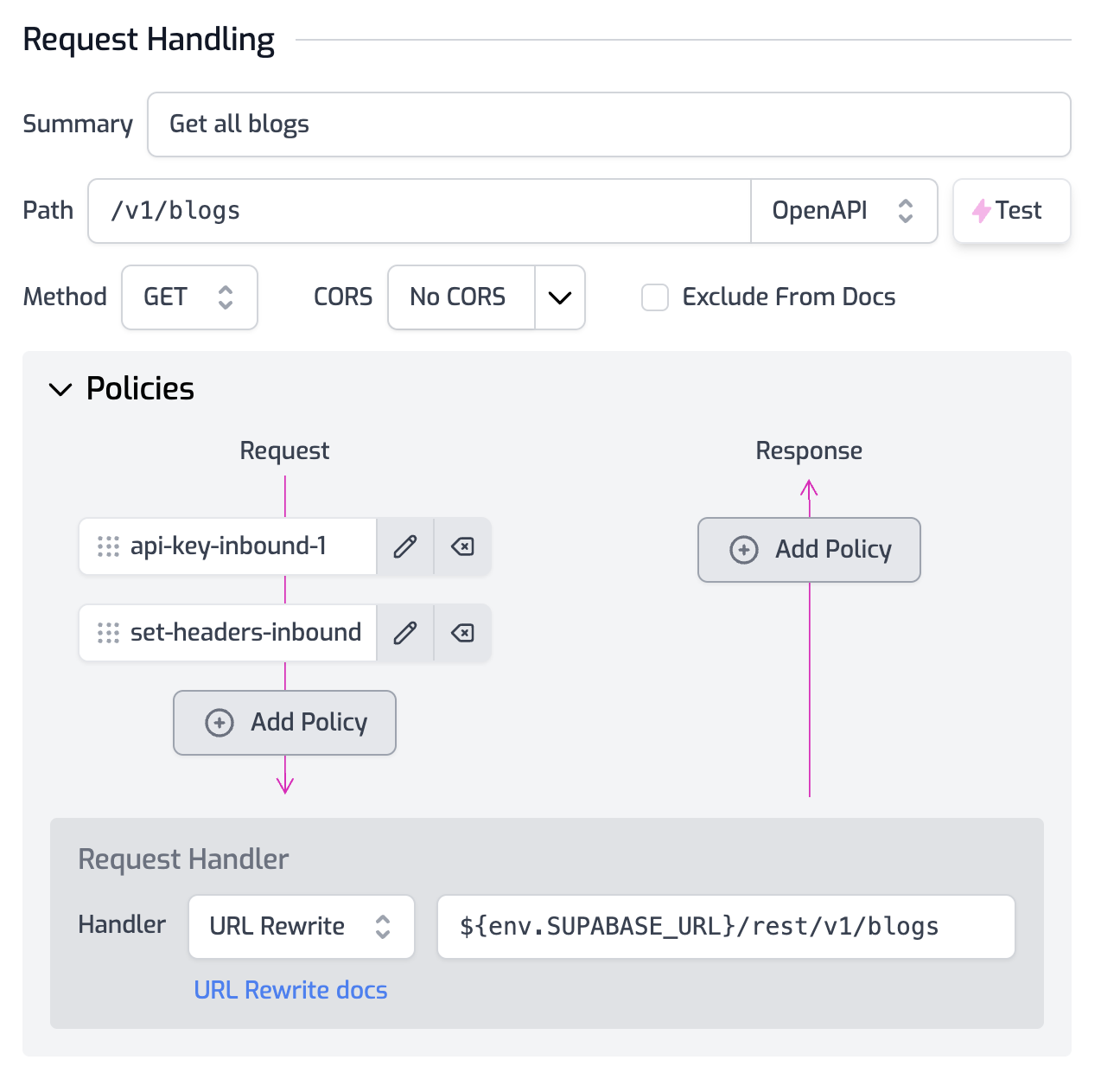
**Make sure to reorder the policies** (just like in the picture below) by
drag-and-dropping so that `api-key-inbound` policy runs before
`set-headers-inbound`, this way you stop unauthenticated requests from being
rejected before adding the secret headers.
:::info
If you check the policies in the `POST` operation, you'll see that it includes
the `rate-limit-inbound` policy which we didn't add to the `GET` operation. This
way we can rate limit for expensive operations (like using OpenAI) but not for
cheap ones (like reading from the DB).
:::
Save your configuration and... that's it! Now only authenticated users can
access the route. If you test it without an API Key you'll get a 401 error.
## This is Day 1 of Supaweek
If you have any questions, comments or feedback, join us in our
[Discord](https://discord.zuplo.com) server, or drop us a tweet (or _xeet_...)
at [X](https://x.com/zuplo). We'd love to hear from you!
Check out [Day 2 of the Supaweek](/blog/handling-user-requests-dynamically),
where we'll add user-level auth to the API.
### Step 3 - Add the required environment variables
In **_Project Settings > Environment Variables_** add the following API Keys
with your own values:
```
OPENAI_API_KEY=
SUPABASE_URL=
SUPABASE_SERVICE_ROLE_KEY=
```
### Step 4 - Explore the existing routes
Click on **_File > routes.oas.json > Create a blog using AI_** and you'll see
the route `/v1/blogs` with the `POST` method. If you now click on Policies,
you'll see the following:

This is the flow of any request that goes from your gateway to the backend:
1. The request will first hit the **_api-key-inbound_** policy: this means that
unauthenticated requests will be rejected with a 401 (and a beautiful error
message)
2. It will then go through the **_rate-limit-inbound_** policy, if you click on
it you will see that it is configured to only accept 10 requests per minute
per user. How does it know about the user? Because they're using an API Key
it automatically understands how to block the request.
3. The request will now go to the **_Request handler_** (i.e. the backend). In
this case it's a _Function Handler_, a programmable handler of Zuplo. If you
**Click on `generate-blog`**, and you'll see the code for handling the `POST`
requests using OpenAI to generate a blog post and save it into your Suabase
DB.
### Step 5 - Create an API Key
To make an authenticated request to the API, create an API Key in **_Project
Settings > API Key Consumers > Add New Consumer_**. You can leave the metadata
and manager fields as they are for now.
Once you have created the API Key, copy it as we will use it in the next step.
### Step 6 - Make a request to the API!
Now that you're all set create a blog using the `POST` method on `/v1/blogs`.
You can make requests using the test console (similar to Postman) which you can
find by clicking on the route as follows:

1. Add your API Key header in the format `Authorization: Bearer zpka_1234` and
make a request
2. Add the request body. This endpoint accepts a JSON in the format
`{ "topic": "you blog topic" }`. Add it to whichever topic you want OpenAI to
create the blog about.
3. Hit **_Test_**! 💥
Now you have a ready API, with Auth, rate limiting, and using some of the best
services like OpenAI to spice up your API with AI and Supabase DB with a
programmable layer to access your data.
### Step 7 - Add a `GET` route to get all blogs
#### 1. Create the `GET` route
Click on **_File > routes.oas.json > Add Route_**. Configure the route as
follows:
```
Description: Get all blogs
Path: /v1/blogs
Method: GET
```
If you click on _Save all_ and then test the route, by default, you will see
that it returns the request that's forwarded to `https://echo.zuplo.io`, which
is a service that echoes back the request. This is because we haven't configured
the route to do anything yet.
#### 2. Configure the Request Handler
Let's change the request handler to return the blogs from the Supabase DB. Click
on the route and then on the `GET` operation. You'll see that the request
handler is set to `https://echo.zuplo.io`.
Change the handler to `URL Rewrite`, which hits the configured URL without
passing any of the original request path or query parameters. Then, change the
URL to your Supabase DB URL: `${env.SUPABASE_URL}/rest/v1/blogs`, this is
because
Supabase exposes their DB in a RESTful API
so you can access it conveniently.
If you click on _Save all_ and then test the route, you'll have an error from
Supabase saying that you're not authorized to access the DB:
```
{
"message": "No API key found in request",
"hint": "No `apikey` request header or url param was found."
}
```
In the next step, we will add the necessary headers to make the request
authorized. The headers will be added by Zuplo, so only the Gateway can access
the DB but not the user.
#### 3. Add the Supabase headers
In the route's request path, click on _**Add Policy**_ and search of **_Add or
Set Request Headers_**, click on the policy to add it to the route and configure
it as follows, which will add the headers `apikey` and `Authorization` and
configure them with the Supabase Service Role Key which is needed by Supabase to
authorize the request:
```json
{
"export": "SetHeadersInboundPolicy",
"module": "$import(@zuplo/runtime)",
"options": {
"headers": [
{
"name": "apikey",
"value": "$env(SUPABASE_SERVICE_ROLE_KEY)",
"overwrite": true
},
{
"name": "Authorization",
"value": "Bearer $env(SUPABASE_SERVICE_ROLE_KEY)",
"overwrite": true
}
]
}
}
```
Now save the configuration and test the route. You should see the blogs from the
DB! But the route is not secure and anyone can access it. Let's add
authentication to it.
#### 4. Add authentication to the route
Click on _**Add Policy**_ again and now select from the top the
`api-key-inbound` policy from the **Existing** policies list.

**Make sure to reorder the policies** (just like in the picture below) by
drag-and-dropping so that `api-key-inbound` policy runs before
`set-headers-inbound`, this way you stop unauthenticated requests from being
rejected before adding the secret headers.

:::info
If you check the policies in the `POST` operation, you'll see that it includes
the `rate-limit-inbound` policy which we didn't add to the `GET` operation. This
way we can rate limit for expensive operations (like using OpenAI) but not for
cheap ones (like reading from the DB).
:::
Save your configuration and... that's it! Now only authenticated users can
access the route. If you test it without an API Key you'll get a 401 error.
## This is Day 1 of Supaweek
If you have any questions, comments or feedback, join us in our
[Discord](https://discord.zuplo.com) server, or drop us a tweet (or _xeet_...)
at [X](https://x.com/zuplo). We'd love to hear from you!
Check out [Day 2 of the Supaweek](/blog/handling-user-requests-dynamically),
where we'll add user-level auth to the API.