---
title: "10 API Rate Limiting Best Practices (2026 Guide)"
description: "Learn 10 essential API rate limiting strategies — from traffic analysis and algorithm selection to dynamic adjustments and caching. With code examples."
canonicalUrl: "https://zuplo.com/learning-center/10-best-practices-for-api-rate-limiting-in-2026"
pageType: "learning-center"
authors: "adrian"
tags: "API Rate Limiting, API Best Practices, Tutorial"
image: "https://zuplo.com/og?text=10%20API%20Rate%20Limiting%20Best%20Practices%20(2026%20Guide)"
---
[API rate limiting](https://zuplo.com/docs/rate-limiting/getting-started?utm_source=blog) is
critical for managing traffic, protecting resources, and ensuring stable
performance. Here's a quick guide to the **10 best practices** for implementing
effective rate limiting in 2026:
1. [**Analyze traffic patterns**](#1-analyze-api-traffic-patterns): Study peak
usage times, request frequency, and growth trends to set appropriate limits.
2. [**Choose the right algorithm**](#2-choose-the-right-rate-limiting-algorithm):
Use Fixed Window, Sliding Window, Token Bucket, or Leaky Bucket based on your
API's needs.
3. [**Apply key-level limits**](#3-apply-key-level-rate-limiting): Assign limits
per API key with tiered options for different user types.
4. [**Set resource-based limits**](#4-implement-resource-based-rate-limiting):
Add specific limits for high-demand endpoints like uploads or search queries.
5. [**Use an API gateway**](#5-configure-an-api-gateway-or-middleware): Open
source or SaaS gateways simplify enforcement and monitoring.
6. [**Set proper timeouts**](#6-set-proper-timeouts-and-windows): Define time
windows and block durations to curb abuse and keep access fair.
7. [**Track user activity**](#7-track-user-activity): Monitor request patterns,
error rates, and data volume to adjust limits dynamically.
8. [**Adjust limits dynamically**](#8-adjust-rate-limits-dynamically): Adapt
limits in real time based on server load, traffic, and response times.
9. [**Leverage caching**](#9-use-caching-strategies): Use Redis and CDNs to cut
redundant requests and improve performance.
10. [**Adopt an API management platform**](#10-use-an-api-management-platform):
Get advanced analytics, custom rate limiting, and global distribution.
This article focuses on the technical implementation of rate limiting. If you're
already comfortable with algorithms, check out our advanced guide —
[the subtle art of rate limiting](/learning-center/subtle-art-of-rate-limiting-an-api) —
which covers higher-level decisions like keeping limits secret, observability,
and latency/accuracy tradeoffs.
## Quick Comparison of Rate Limiting Algorithms
| Algorithm | Best for | Key behavior |
| -------------- | ----------------------- | ------------------------------- |
| Fixed Window | Simple traffic patterns | Resets at fixed intervals |
| Sliding Window | Smooth traffic control | Uses rolling time windows |
| Token Bucket | Handling traffic bursts | Refills tokens over time |
| Leaky Bucket | Consistent request flow | Processes requests at a steady rate |
These strategies help you balance performance, security, and scalability so your
APIs stay reliable and efficient in 2026. Let's dive into each one.
## Rate limiting explained (video overview)
Prefer to watch instead of read? This overview covers the algorithms,
implementation patterns, and best practices we walk through below.
## 1\. Analyze API Traffic Patterns

To set up effective rate limiting, you need a solid understanding of your API's
traffic patterns. By analyzing both historical and real-time data, you can
create limits that protect your infrastructure while still meeting user demand —
and handle growth and unexpected traffic surges without surprises.
**Metrics to keep an eye on:** peak usage times and how long they last, average
requests per user, the frequency and duration of unusual spikes, long-term usage
trends, and patterns in server load. This analysis helps you spot bottlenecks
and risks early.
Break your monitoring into cadences. **Daily** review pinpoints peak hours so you
can adjust limits during high-demand times. **Weekly** review surfaces recurring
patterns that establish baseline thresholds. **Monthly** review tracks growth
trends and helps you plan future capacity. Regular monitoring also flags
anomalies, like sudden spikes from specific IPs that can signal
[DDoS attacks](https://konghq.com/blog/learning-center/what-is-api-rate-limiting).
Once you have a clear picture of your traffic, the next step is choosing the
right algorithm to enforce your limits.
## 2\. Choose the Right Rate Limiting Algorithm
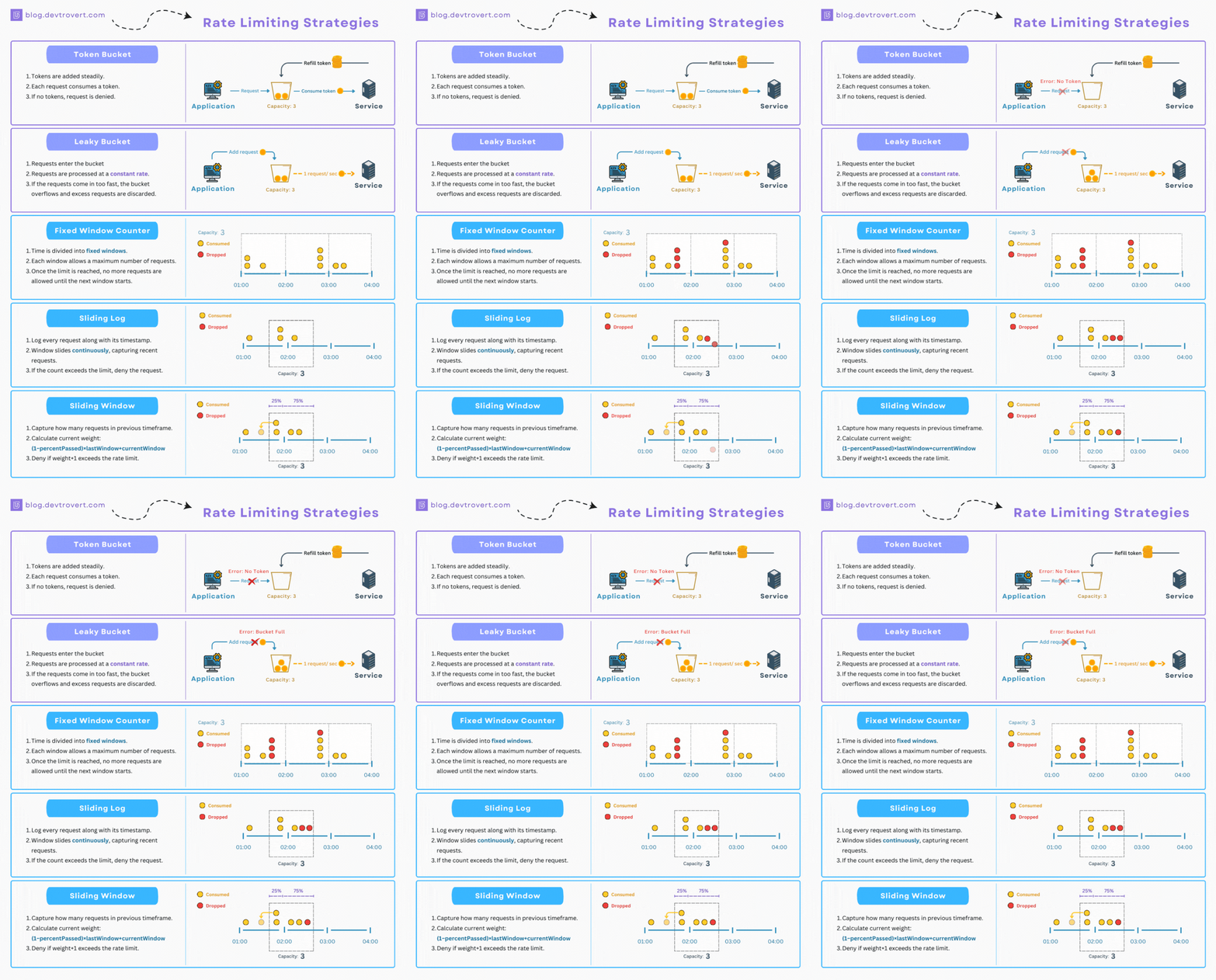
Choosing the right algorithm is crucial for managing traffic effectively. Each
one has strengths, and the best choice depends on your traffic patterns and
constraints:
- **Fixed Window** — simplest to implement; resets counters at fixed intervals.
Watch for traffic spikes at window boundaries.
- **Sliding Window** — smooths traffic using a rolling time window and avoids the
edge spikes of fixed windows, at the cost of slightly more complexity.
- **Leaky Bucket** — processes requests at a steady rate, ideal for APIs that
need a consistent, predictable flow.
- **Token Bucket** — refills tokens over time so it can absorb occasional bursts,
making it great for variable traffic.
When deciding, weigh three factors: your **traffic patterns** (bursty APIs often
favor Token Bucket), the **resource use** of each algorithm (memory and compute),
and the **complexity** your team can realistically maintain.
Worth knowing: Zuplo's rate limiter uses a
[sliding window algorithm](https://zuplo.com/docs/rate-limiting/how-it-works)
enforced globally across every edge location. Because it tracks requests over a
rolling window rather than resetting at fixed intervals, you get smoother, more
predictable throttling without the boundary bursts a fixed window can allow.
Once you've picked an algorithm, the next step is applying it at the right key
level.
## 3\. Apply Key-Level Rate Limiting
Key-level rate limiting controls the number of requests tied to each API key, so
no single user or application can overwhelm your system. This keeps performance
steady and your infrastructure reliable.
Start by setting tiered limits based on user needs:
| Tier | Requests/Minute | Ideal for |
| ------------ | --------------- | -------------------------- |
| Basic | 60 | Individual developers |
| Professional | 300 | Small to medium businesses |
| Enterprise | 1000+ | High-volume users |
Then monitor key activity to track how each key is used, spot misuse, and adjust
limits based on real-time data. For the best results, **tailor limits** per
endpoint based on resource demands, **give users feedback** on their current
usage and remaining quota, offer small **buffer zones** so legitimate users
aren't cut off abruptly, and lean on **robust analytics** to refine limits over
time.
Zuplo's
[Rate Limiting policy](https://zuplo.com/docs/policies/rate-limit-inbound) can
limit by `user`, where the user is identified by their API key — so key-level
limiting is a configuration change, not a custom build.
## 4\. Implement Resource-Based Rate Limiting
Resource-based limiting keeps high-demand endpoints running smoothly, even during
heavy usage. By setting limits based on how expensive each operation is, you
maintain steady performance and avoid bottlenecks in critical parts of your API.
A practical starting point is to match limits to resource cost:
| Endpoint type | Rate limit (with burst) |
| -------------------- | ------------------------- |
| File upload/download | 10/minute (burst: 15) |
| Read operations | 1000/minute (burst: 1500) |
| Write operations | 100/minute (burst: 150) |
| Search queries | 300/minute (burst: 450) |
File uploads and search queries consume significant CPU and bandwidth, so they
warrant the strictest limits, while lightweight read operations can run much
higher. From there, monitor server load and endpoint performance so you can
fine-tune limits as real usage evolves. Modern gateways can automate these
adjustments based on peak usage and overall demand.
With resource-based limits in place, the next step is configuring the gateway or
middleware that enforces them.
## 5\. Configure an API Gateway or Middleware
An API gateway is the cleanest place to enforce limits, because it sits in front
of your services and controls traffic before it reaches your origin. It works
alongside key-level and resource-based strategies to give you precise control.
A solid gateway setup covers a few essentials: **usage plans** that set quotas
per client, unique
[**API keys**](/learning-center/api-key-authentication) to identify and manage
access, **burst limits** (for example, 1.5x the base limit) to absorb short
spikes, and clear feedback via
[**429 (Too Many Requests)**](/learning-center/http-429-too-many-requests-guide#implementing-http-429-errors-and-the-retry-after-header)
responses. Always return standard rate limit headers — the IETF `RateLimit`
family (`RateLimit-Limit`, `RateLimit-Remaining`, `RateLimit-Reset`) and
[`Retry-After`](/learning-center/http-429-too-many-requests-guide#steps-to-implement-http-429-errors-and-retry-after)
— so clients can back off gracefully. HTTP field names are case-insensitive, and
HTTP/2 puts them on the wire in lowercase, so clients should treat
`RateLimit-Limit` and `ratelimit-limit` as the same header. Zuplo's rate limiting
policies return `Retry-After` on every throttled request by default (the
`headerMode` option, which you can set to `none` to suppress it); the
`RateLimit-*` family isn't automatic, but the policy hands you the limit and
remaining count programmatically so you can set those headers in a
[custom 429 response](https://zuplo.com/examples/custom-429-response).
Because the gateway enforces limits at the infrastructure level, you get
consistent traffic control without touching application code. Platforms like
Zuplo also support
[dynamic rate limiting](/blog/why-zuplo-has-the-best-damn-rate-limiter-on-the-planet#dynamic-rate-limiting)
with programmable limits that adjust based on real-time traffic and user
properties — no manual intervention required. Pair that with gateway-level
[caching](https://zuplo.com/docs/policies/caching-inbound) (via Redis or a CDN) to
cut redundant calls, and keep load balancing consistent across servers so limits
apply uniformly.
## 6\. Set Proper Timeouts and Windows
Timeouts and windows keep systems running smoothly and allocate resources fairly.
They prevent overloads while minimizing disruption for legitimate users. Three
settings do most of the work:
- **Window duration (15–60 minutes)** defines the time frame for tracking
requests.
- **Block duration (5–30 minutes)** temporarily blocks abusive clients.
- **Reset period (24 hours)** resets usage quotas for users.
Dynamic timeouts take this further by adjusting in real time based on traffic
patterns, so you can absorb spikes while still serving legitimate users. To keep
timeouts well-tuned, review them regularly against request patterns, server load,
user feedback, and error rates. Match the values to your API's purpose —
latency-sensitive apps need shorter timeouts, while data-heavy APIs may need
longer ones — and combine timeouts with caching to reduce unnecessary requests.
With timeouts in place, the next step is actively monitoring user activity to
keep your strategy fair and effective.
## 7\. Track User Activity
To manage rate limits well, keep a close eye on how users interact with your API.
Monitoring behavior alongside key-level and resource-based limits protects both
performance and security. Focus on a few high-signal metrics:
- **Request patterns** — call frequency and timing; adjust limits when activity
looks unusual.
- **Data volume** — payload sizes; apply stricter limits for heavy data users.
- **Error rates** — failed requests; investigate repeated limit violations.
Review daily and weekly trends to set benchmarks and detect anomalies, then
segment users to craft more precise rules — for example by business vs.
off-hours activity, geography, user group, or industry. Automated detection helps
you catch suspicious behavior like sudden request spikes from a single user,
traffic outside normal hours, repeated failed logins, or access from unexpected
locations. Feed all of this back into your limits so they stay in sync with real
usage.
## 8\. Adjust Rate Limits Dynamically

[Dynamic rate limiting](/blog/why-zuplo-has-the-best-damn-rate-limiter-on-the-planet#dynamic-rate-limiting)
takes static methods a step further by adjusting restrictions in real time. It
keeps APIs stable during fluctuating demand by automatically modifying limits
based on server load, traffic, and overall system performance.
In practice, dynamic limiting watches signals like **server load** (reduce limits
when CPU exceeds 80%), **request volume** (throttle during surges), **error
rates** (lower limits when failures pass 5%), and **response time** (adjust
concurrency when latency crosses 500ms). Adaptive algorithms like Token Bucket
and Sliding Window handle these real-time adjustments well.
To implement it, monitor server metrics continuously, set automated triggers that
adjust limits gradually to avoid sudden disruptions, and build in fallback
mechanisms for extreme loads. In distributed systems, make sure limit changes
apply consistently and caches stay synchronized.
For the most advanced scenarios — multiple counters, or increments that depend on
response data — Zuplo's
[Complex Rate Limiting policy](https://zuplo.com/docs/policies/complex-rate-limit-inbound)
lets you define several named limits and override how much each request
increments them programmatically. That's the foundation for usage-based pricing
and metering, where a single request might cost more "budget" than another.
## 9\. Use Caching Strategies
Caching works hand-in-hand with rate limiting to minimize redundant API calls and
boost performance. By storing frequently accessed data close to where it's
needed, you reduce server strain and speed up responses — which also keeps users
from hitting limits unnecessarily.
An effective setup usually combines **in-memory tools** like Redis or
[Memcached](https://memcached.org/) for fast retrieval, **CDNs** to cache content
closer to users (you can even
[host your entire API at the edge](/learning-center/api-business-edge)), and
**HTTP caching headers** to manage client-side behavior:
| Header | Purpose | Example |
| ------------- | ---------------------------- | ----------------------------------------- |
| Cache-Control | Sets caching policies | `Cache-Control: max-age=3600, public` |
| Expires | Specifies expiration time | `Expires: Fri, 02 Jan 2026 15:00:00 GMT` |
| ETag | Enables conditional requests | `ETag: "33a64df551425fcc55e4d42a1487..."` |
To get the most from caching, track cache hit ratios with tools like
[Prometheus](https://prometheus.io/), tune expiration times to how often data
changes, and apply proper cache invalidation so you never serve stale data.
Encrypt any sensitive cached information and audit it regularly. For frequently
updated data — think weather forecasts — caching only fetches new data when
necessary, dramatically reducing load on high-traffic endpoints.
## 10\. Use an API Management Platform
If you made it this far, it's worth pitching
[Zuplo](https://zuplo.com/?utm_source=blog). A modern API management platform
bundles most of the practices in this article into an end-to-end solution, so you
don't have to stitch together infrastructure yourself.
The pieces that matter most for rate limiting: a **globally distributed gateway**
that reduces latency worldwide, [**GitOps deployment**](/learning-center/what-is-gitops)
so you can adjust limits quickly and safely, **advanced analytics** for real-time
usage monitoring,
[**custom rate limiting**](/blog/why-zuplo-has-the-best-damn-rate-limiter-on-the-planet),
and full
[**programmability**](https://zuplo.com/docs/programmable-api/overview?utm_source=blog) to
evaluate and customize behavior at runtime in TypeScript. On top of that, Zuplo
adds strong authentication and
[detailed audit logging](https://zuplo.com/docs/policies/audit-log-inbound) for
compliance, with a distributed design that keeps performance steady as you scale.
The payoff is that developers build custom rate-limiting rules directly in the
gateway — no extra infrastructure to run — while integrating smoothly with
existing systems.
## Putting These Rate Limiting Practices Into Action
As we move deeper into 2026, managing API rate limits is essential for secure,
efficient systems. The through-line across all ten practices is the same: combine
traffic analysis with the right algorithm and adaptive, real-time enforcement so
you can prevent abuse without punishing legitimate users. Done well, that means
lower server load and faster responses, stronger protection against abuse and
DDoS, fairer resource allocation, and a more consistent user experience.
The future of API rate limiting hinges on balancing protection with
accessibility. By adopting these practices — and continuously refining them as
your traffic grows — you can keep your APIs secure, efficient, and ready for
whatever demand comes next.
## Frequently Asked Questions
**What is a good API rate limit?** There's no universal number — a good limit
matches each endpoint's cost to your users' real needs. A common starting point
is 60 requests per minute per API key for public endpoints, tighter limits
(around 10/minute) on expensive operations like uploads or search, and higher
thresholds for trusted enterprise tiers. Start conservative, watch your 429
rates, and adjust based on real usage.
**What is the best way to implement rate limiting?** Match the algorithm to your
traffic: Fixed Window for steady traffic, Sliding Window for fluctuating
patterns, Token Bucket for bursts, and Leaky Bucket for queue-based processing.
Pair it with monitoring so you can adjust over time. An
[API gateway](https://zuplo.com/docs/rate-limiting/getting-started?utm_source=blog) lets you
enforce this without custom infrastructure.
**How do you avoid hitting rate limits in an API integration?** Cache frequently
accessed data, handle `429` responses with retry/back-off logic, spread requests
evenly over time, and monitor your usage patterns so you stay under the
threshold.
**What is an example of a rate limit in an API?** A common example is limiting
calls to "10 requests per minute per client." Dynamic APIs often go further with
resource-based limits — different thresholds for different endpoints — so
critical endpoints stay available even when others hit their caps. When setting
limits, weigh server capacity, typical user behavior, the resource demands of
each endpoint, and your availability goals.