[API Rate Limiting](https://zuplo.com/features/rate-limiting?utm_source=blog) is
critical for managing traffic, protecting resources, and ensuring stable
performance. Here's a quick guide to the **10 best practices** for implementing
effective rate limiting in 2026:
1. [**Understand Traffic Patterns**](#1-analyze-api-traffic-patterns): Analyze
peak usage times, request frequency, and growth trends to set appropriate
limits.
2. [**Choose the Right Algorithm**](#2-select-the-appropriate-algorithm): Use
algorithms like Fixed Window, Sliding Window, Token Bucket, or Leaky Bucket
based on your API's needs.
3. [**Key-Level Rate Limiting**](#3-apply-key-level-rate-limiting): Assign
limits per API key with tiered options for different user types.
4. [**Resource-Based Limits**](#4-implement-resource-based-rate-limiting): Set
specific limits for high-demand endpoints like uploads or search queries.
5. [**Use API Gateways**](#5-configure-api-gateways-or-middleware): Open source
or SaaS offerings can simplify enforcement and monitoring.
6. [**Set Timeouts**](#6-set-proper-timeouts): Define time windows and block
durations to manage abuse and ensure fairness.
7. [**Track User Activity**](#7-track-user-activity): Monitor metrics like
request patterns, error rates, and data volume to adjust limits dynamically.
8. [**Dynamic Rate Limiting**](#8-adjust-rate-limits-dynamically): Adapt limits
in real time based on server load, traffic, and response times.
9. [**Leverage Caching**](#9-use-caching-strategies): Use tools like Redis and
CDNs to reduce redundant requests and improve performance.
10. [**Adopt API Management Platforms**](#10-use-api-management-platforms): API
Management Platforms offer advanced analytics, custom rate limiting, and
global distribution.
This article primarily focuses on the technical implementation of rate limiting.
If you're already an expert on stuff like rate limiting algorithms - check out
our advanced guide -
[the subtle art of rate limiting](/learning-center/subtle-art-of-rate-limiting-an-api).
It covers higher level decision making and considerations around rate limiting
(ex. keeping limits secret, observability, latency/accuracy tradeoffs).
### Quick Comparison of Algorithms
| **Algorithm** | **Best For** | **Key Features** |
| -------------- | ----------------------- | ----------------------------------- |
| Fixed Window | Simple traffic patterns | Resets at fixed intervals |
| Sliding Window | Smooth traffic control | Uses rolling time windows |
| Token Bucket | Handling traffic bursts | Refills tokens over time |
| Leaky Bucket | Consistent request flow | Processes requests at a steady rate |
These strategies help you balance performance, security, and scalability,
ensuring your APIs remain reliable and efficient in 2026. Let’s dive deeper into
each practice!
## Rate Limiting - System Design Interview
Here's a quick overview video on rate limiting in case you prefer to watch
instead of reading. It covers a lot of what we mention below.
Don't worry, I won't be mad if you stop scrolling here.
## 1\. Analyze API Traffic Patterns

To set up effective rate limiting, you need a solid understanding of your API's
traffic patterns. By analyzing both historical and real-time data, you can
create rate limits that balance protecting your infrastructure with meeting user
demands. This ensures your API can handle growth and unexpected traffic surges.
**Metrics to keep an eye on**:
- Peak usage times and how long they last
- Average requests per user
- Frequency and duration of unusual traffic spikes
- Long-term usage trends
- Patterns in server load
This kind of analysis helps you spot potential bottlenecks or risks early.
Here's how to break down your monitoring:
- **Daily**: Pinpoint peak hours and adjust limits during high-demand times.
- **Weekly**: Look for recurring patterns to establish baseline thresholds.
- **Monthly**: Track growth trends and plan for future capacity needs.
Regular monitoring can also alert you to anomalies, like sudden traffic spikes
from specific IPs, which might indicate threats such as DDoS attacks
[\[2\]](https://konghq.com/blog/learning-center/what-is-api-rate-limiting)[\[4\]](https://datadome.co/bot-management-protection/what-is-api-rate-limiting/).
**Best practices for monitoring traffic**:
- Continuously track API traffic
[\[1\]](https://testfully.io/blog/api-rate-limit/).
- Prepare for seasonal demand changes
[\[2\]](https://konghq.com/blog/learning-center/what-is-api-rate-limiting).
- Assess the impact of new features on traffic
[\[1\]](https://testfully.io/blog/api-rate-limit/).
Once you've got a clear picture of your traffic patterns, the next step is
selecting the right algorithm to enforce your rate limits effectively.
## 2\. Select the Appropriate Algorithm
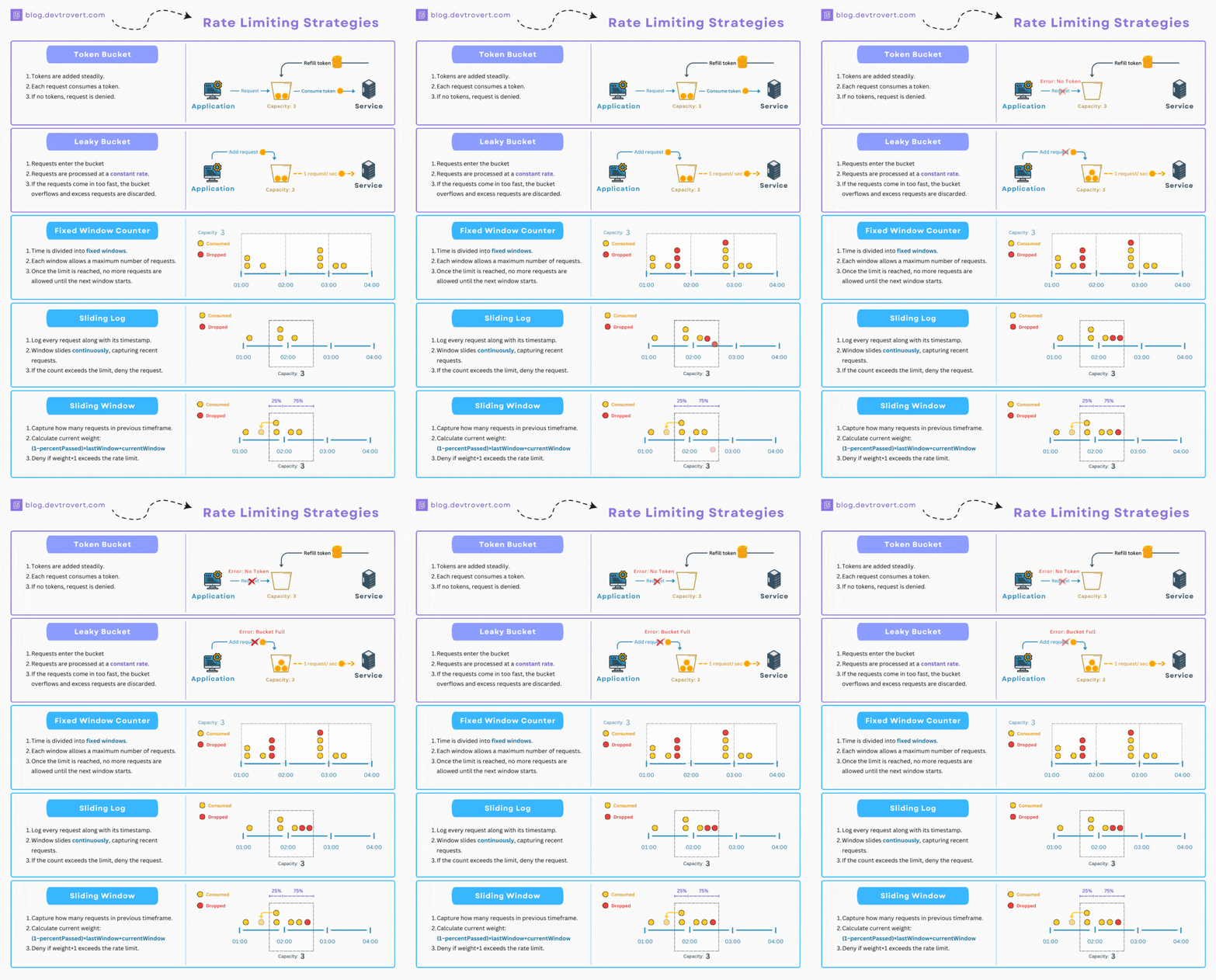
Choosing the right rate-limiting algorithm is crucial for effectively managing
your API's traffic. Each algorithm has its strengths, and the best choice
depends on your API's traffic patterns and specific needs.
Here's a breakdown of four commonly used rate-limiting algorithms:
| **Algorithm** | **Best For** | **Key Features** | **Things to Keep in Mind** |
| -------------- | -------------------------- | ------------------------------------- | -------------------------------------- |
| Fixed Window | Simpler implementations | Resets counters at fixed intervals | May cause traffic spikes at boundaries |
| Sliding Window | Maintaining smooth traffic | Uses a rolling time window | More complex, but avoids edge spikes |
| Leaky Bucket | Stable request processing | Processes requests at a steady rate | Ideal for APIs needing consistent flow |
| Token Bucket | Handling traffic bursts | Refills tokens over time for requests | Great for variable traffic patterns |
### What to Consider When Choosing
- **Traffic Patterns**: Match the algorithm to how your API is typically used.
For example, if your API experiences frequent bursts, Token Bucket might be a
better fit
[\[2\]](https://konghq.com/blog/learning-center/what-is-api-rate-limiting)[\[4\]](https://datadome.co/bot-management-protection/what-is-api-rate-limiting/).
- **Resource Use**: Evaluate how much computational power and memory the
algorithm requires [\[1\]](https://testfully.io/blog/api-rate-limit/).
- **Complexity**: Make sure the algorithm's implementation aligns with your
team's ability to maintain it
[\[2\]](https://konghq.com/blog/learning-center/what-is-api-rate-limiting).
Dynamic rate limiting can further improve performance by adjusting thresholds
based on real-time metrics like server load and user behavior. For instance,
combining the Sliding Window algorithm with dynamic limits allows you to handle
sudden traffic spikes without compromising API stability
[\[1\]](https://testfully.io/blog/api-rate-limit/).
Once you've chosen the right algorithm, the next step is to fine-tune your
rate-limiting strategy by applying it to the appropriate key levels.
## 3\. Apply Key-Level Rate Limiting
Key-level rate limiting helps manage API usage by controlling the number of
requests tied to each API key. This ensures no single user or application
overwhelms your system, keeping performance steady and your infrastructure
reliable.
### Implementation Strategy
Set up rate limits based on user needs with tiered options:
| Tier | Requests/Minute | Burst Allowance | Ideal For |
| ------------ | --------------- | --------------- | -------------------------- |
| Basic | 60 | 100 | Individual developers |
| Professional | 300 | 500 | Small to medium businesses |
| Enterprise | 1000+ | Custom | High-volume users |
### Monitoring and Adjustments
Regularly monitor API key activity to:
- Track how each key is being used and identify patterns.
- Spot unusual activity or potential misuse.
- Adjust limits dynamically based on server load and real-time data.
### Integration with API Gateways
Zuplo's
[Rate Limiting Policy](https://zuplo.com/docs/policies/rate-limit-inbound)
includes an option to rate limit by `user` where the user is identified by their
API key.
Here's a tutorial:
### Tips for Effective Implementation
To get the most out of key-level rate limiting, keep these tips in mind:
- **Tailored Limits**: Set different thresholds for specific endpoints based on
their resource demands.
- **User Feedback**: Inform users about their current usage and remaining quota
in real time.
- **Buffer Zones**: Offer small grace periods to avoid sudden service
disruptions for legitimate users.
- **Robust Monitoring**: Use detailed analytics to refine limits and respond to
changing usage patterns.
While this method targets individual users or apps, it works best alongside
[resource-based rate limiting](https://zuplo.com/docs/policies/rate-limit-inbound)
to manage overall endpoint efficiency.
## 4\. Implement Resource-Based Rate Limiting
This approach helps keep high-demand endpoints running smoothly, even during
heavy usage. By setting limits based on resource usage, you can maintain steady
performance and avoid bottlenecks in critical parts of your API.
### How to Apply It
| **Endpoint Type** | **Rate Limit (with Burst)** | **Reasoning** |
| -------------------- | --------------------------- | ------------------------------ |
| File Upload/Download | 10/minute (burst: 15) | Consumes significant resources |
| Read Operations | 1000/minute (burst: 1500) | Minimal system impact |
| Write Operations | 100/minute (burst: 150) | Moderate resource usage |
| Search Queries | 300/minute (burst: 450) | CPU-heavy tasks |
Here's a tutorial on implementing resource based rate limiting using Zuplo:
### Adapting to Real-Time Conditions
Modern APIs benefit from automated systems that monitor server load and resource
usage. These systems adjust rate limits dynamically, taking into account factors
like peak usage times and overall demand.
### Tips for Protecting High-Impact Endpoints
- Pay close attention to endpoints that require significant resources, such as
file uploads or search functions.
- Set stricter limits on these endpoints to prevent system overload and maintain
reliability.
### Continuous Monitoring and Fine-Tuning
Regularly review API usage patterns, resource stats, and endpoint performance.
This helps you adjust limits effectively and keep your API responsive.
Once you've established resource-based rate limits, you can move on to
configuring your API gateways or middleware to enforce them seamlessly.
## 5\. Configure API Gateways or Middleware
API gateways and middleware are essential for managing traffic limits and
keeping systems stable. They work alongside key-level and resource-based
strategies to offer precise control over incoming requests.
### Gateway Setup Tips
| Component | Configuration | Purpose |
| ------------------------------------------------------- | -------------------------------------------------------------------------------------------------------------------------------------------------------------------------------------------------- | ----------------------------------------- |
| **Usage Plans** | Set quotas per client | Monitor and limit usage per client |
| **[API Keys](/learning-center/api-key-authentication)** | Assign unique keys | Manage and identify client access |
| **Burst Limits** | Allow short-term spikes (e.g., 1.5x base limit) | Handle temporary surges in traffic |
| **Response Codes** | [Use 429 (Too Many Requests)](/learning-center/http-429-too-many-requests-guide#implementing-http-429-errors-and-the-retry-after-header) | Provide clear feedback for limit breaches |
| **Headers** | Include `X-RateLimit-Limit`, `X-RateLimit-Remaining`, `X-RateLimit-Reset` or [`Retry-After`](/learning-center/http-429-too-many-requests-guide#steps-to-implement-http-429-errors-and-retry-after) | Track and communicate usage details |
### How to Implement
API gateways manage rate limiting directly at the infrastructure level, ensuring
seamless traffic control. Here's a tutorial on implementing dynamic rate
limiting using Zuplo:
### Using Dynamic Rate Limiting
[Dynamic rate limiting](/blog/why-zuplo-has-the-best-damn-rate-limiter-on-the-planet#dynamic-rate-limiting)
can be achieved with tools like Zuplo, which have programmable rate limits that
can automatically adjust based on real-time traffic, user properties, etc. This
approach ensures your system can handle fluctuating demand without manual
intervention, and can be tailored to your user's needs.
### Boosting Performance with Caching
Integrating caching solutions like **Redis** can significantly reduce
unnecessary API calls. By storing frequently requested data, caching prevents
users from hitting rate limits unnecessarily and improves overall API
responsiveness. Caching can also be done
[at the gateway level](https://zuplo.com/docs/articles/cache#examples) instead
of relying on an additional service.
### Consistent Load Balancing
Make sure your load balancing setup is consistent across all servers to enforce
rate limits uniformly. This helps maintain fairness and prevents discrepancies
in request handling.
Once your gateways or middleware are configured, the next step is to actively
monitor user activity to ensure your rate-limiting strategy stays effective and
equitable.
## 6\. Set Proper Timeouts
Setting timeouts for API rate limiting is essential to keep systems running
smoothly and allocate resources fairly. They help prevent system overloads and
minimize user disruptions.
### Key Timeout Components
| Component | Setting | Purpose |
| ------------------- | ------------- | -------------------------------------------- |
| **Window Duration** | 15-60 minutes | Defines the time frame for tracking requests |
| **Block Duration** | 5-30 minutes | Temporarily blocks users to prevent abuse |
| **Reset Period** | 24 hours | Resets usage quotas for users |
### Using Dynamic Timeouts
Dynamic timeouts adjust in real-time based on traffic patterns. This approach
helps manage spikes in usage while still allowing legitimate users to access the
API.
### Monitoring and Fine-Tuning
To keep your API performing well, regularly review timeout settings. Focus on
these metrics:
- **Request patterns**: Study user activity to set effective time windows.
- **Server load**: Adjust timeout levels based on how much strain the system is
under.
- **User feedback**: Use feedback to tweak timeouts for a better experience.
- **Error rates**: Keep an eye on how often users hit rate limits.
### Best Practices for Timeout Strategies
Choose timeouts that suit your API's purpose. For example, apps needing quick
responses should have shorter timeouts, while APIs handling large data loads
might require longer durations.
### Advanced Techniques
Combine timeout settings with tools like Redis caching. This reduces unnecessary
requests and makes your system more responsive.
Once you've set up effective timeouts, the next step is to monitor user activity
to ensure fair and efficient API usage.
## 7\. Track User Activity
To effectively manage API rate limits, it's essential to keep a close eye on how
users interact with your API. Monitoring user behavior, along with key-level and
resource-based rate limits, helps maintain both performance and security.
### Key Metrics to Watch
| Metric | Purpose | Action Trigger |
| ---------------- | ------------------------------------ | ----------------------------------------------- |
| Request Patterns | Keep an eye on call frequency/timing | Adjust limits when unusual activity is detected |
| Data Volume | Check payload sizes | Apply stricter limits for heavy data users |
| Error Rates | Track failed requests | Investigate repeated violations of limits |
### Analyzing Patterns
Review daily and weekly usage trends to set benchmarks and detect unusual
activity. This allows you to tweak rate limits during peak traffic times.
Different user groups might need tailored limits based on their unique usage
scenarios [\[1\]](https://testfully.io/blog/api-rate-limit/).
### Segmenting Users
Craft more precise rate-limiting rules by breaking down usage data:
- Activity during business vs. off-hours
- Geographic trends in API access
- Specific needs of user groups
- Industry-related usage behaviors
### Spotting Anomalies
Automate the detection of suspicious activity such as:
- Sudden spikes in request volumes from a single user
- High traffic outside of normal hours
- Repeated failed login attempts
- Access from unexpected locations
### Using Analytics to Improve
Use analytics tools to fine-tune your rate limits. Regularly review user
activity data to ensure your limits stay in sync with changing usage patterns
[\[1\]](https://testfully.io/blog/api-rate-limit/).
## 8\. Adjust Rate Limits Dynamically

[Dynamic rate limiting](/blog/why-zuplo-has-the-best-damn-rate-limiter-on-the-planet#dynamic-rate-limiting)
takes static methods a step further by adjusting restrictions in real time. It
helps keep APIs stable during fluctuating demand by automatically modifying
limits based on server load, traffic, and overall system performance.
### Key Metrics to Watch
Dynamic rate limiting focuses on several critical factors:
- **Server load**: Reduces limits when CPU usage exceeds 80%.
- **Request volume**: Introduces throttling during traffic surges.
- **Error rates**: Lowers limits when failures go beyond 5%.
- **Response time**: Adjusts concurrent requests if latency crosses 500ms.
### How It Works
Adaptive algorithms like Token Bucket and Sliding Window are commonly used to
manage these real-time adjustments effectively
[\[2\]](https://konghq.com/blog/learning-center/what-is-api-rate-limiting)[\[4\]](https://datadome.co/bot-management-protection/what-is-api-rate-limiting/).
### Steps for Implementation
1. **Monitor server metrics**: Use tools to track performance in real time.
2. **Set automated triggers**: Configure systems to adjust limits gradually to
prevent sudden disruptions.
3. **Prepare for extremes**: Include fallback mechanisms for handling unusually
high loads.
For distributed systems, ensure rate limit changes are applied consistently,
caches stay synchronized, and recovery processes are automated for when loads
return to normal.
### Why It Matters
Dynamic rate limiting can cut server load by up to 40% during peak times while
maintaining availability [\[1\]](https://testfully.io/blog/api-rate-limit/).
Modern API gateways equipped with these capabilities adjust limits based on:
- Current server capacity
- Past usage trends
- Expected traffic patterns
- Geographic request distribution
[\[3\]](https://dev.to/ethanleetech/4-best-rate-limiting-solutions-for-nextjs-apps-2024-3ljj)
Once dynamic rate limits are in place, the next focus should be on using caching
strategies to minimize redundant API calls.
## 9\. Use Caching Strategies
Caching works hand-in-hand with rate limiting to minimize redundant API calls
and boost system performance. By storing frequently accessed data in easily
accessible locations, it reduces server strain and speeds up response times.
### Implementation Approaches
An effective caching setup often includes:
- **In-memory tools** like Redis or [Memcached](https://memcached.org/) for fast
data retrieval.
- **CDNs** to cache static content closer to users, cutting down latency. You
can actually host your entire API at the CDN layer (aka. the Edge).
[Here's why it's a good idea](/learning-center/api-business-edge).
- **HTTP headers** like
[Cache-Control and ETag](./2025-08-03-optimizing-rest-apis-with-conditional-requests-and-etags.md)
to manage client-side caching effectively.
| Header Type | Purpose | Example Usage |
| ------------- | ---------------------------- | -------------------------------------------------- |
| Cache-Control | Sets caching policies | `max-age=3600, public` |
| Expires | Specifies expiration time | `Expires: Wed, 2 Jan 2025 15:00:00 GMT` |
| ETag | Enables conditional requests | `ETag: "33a64df551425fcc55e4d42a148795d9f25f89d4"` |
### Optimization and Monitoring
To make the most of caching:
- Use tools like **[Prometheus](https://prometheus.io/)** to track cache hit
ratios.
- Adjust expiration times based on how often the data changes.
- Implement cache invalidation for data that needs to stay up-to-date.
- Encrypt any sensitive information stored in the cache.
### Practical Application
For APIs that deliver frequently updated data, like weather forecasts, caching
can reduce server load by only fetching new data when necessary. This is
especially useful for high-traffic endpoints that might otherwise hit rate
limits quickly.
### Security Considerations
When setting up caching, keep these in mind:
- Encrypt sensitive cached data to protect user information.
- Use secure caching protocols to prevent unauthorized access.
- Conduct regular security audits to ensure cached data remains safe.
- Apply proper cache invalidation to avoid serving outdated or incorrect
information.
Caching not only enhances performance but, when combined with advanced API
management tools, it can make rate-limiting strategies even more efficient.
## 10\. Use API Management Platforms
If you made it this far down, I might as well pitch you on
[Zuplo](https://zuplo.com/?utm_source=blog). In addition to caching strategies,
modern API management platforms like Zuplo can streamline rate-limiting and
boost efficiency. These platforms incorporate many of the practices mentioned in
this article, offering end-to-end solutions for managing APIs.
### Key Platform Features
Zuplo brings together essential tools and advanced capabilities:
| Feature | What It Offers |
| ------------------------------------------------------------------------------------ | ------------------------------------------------------------------------------- |
| Globally Distributed Gateway | Reduces latency for users worldwide |
| [GitOps Integration](/learning-center/what-is-gitops) | Simplifies deployment workflows allowing you to quickly adjust your rate limits |
| Advanced Analytics | Provides real-time usage data and monitoring |
| [Custom Rate Limiting](/blog/why-zuplo-has-the-best-damn-rate-limiter-on-the-planet) | Allows tailored policy creation |
| [Programmability](https://zuplo.com/features/programmable?utm_source=blog) | Evaluate and customize your API's behavior at runtime using code |
### Security and Performance
Zuplo includes advanced authentication options and
[detailed audit logging](https://zuplo.com/docs/policies/audit-log-inbound) for
compliance. Thanks to its distributed design, the platform ensures steady
performance while managing rate limits effectively.
### Tailored for Enterprises
Zuplo is built to handle the demands of organizations of all sizes. It offers
reliable scalability and robust security, with pricing options that fit both
small projects and large-scale operations.
### Developer Advantages
Developers can build custom rate-limiting rules directly within Zuplo,
eliminating the need for additional infrastructure. It integrates smoothly with
existing systems, meeting the growing demand for smarter traffic management and
automation in API management.
## Putting These Rate Limiting Practices Into Action
As we progress further into 2026, managing API rate limits has become essential
for maintaining secure and efficient systems. Examples like Twitter demonstrate
how combining traffic analysis with smart rate-limiting methods can prevent
misuse while keeping services running smoothly
[\[1\]](https://testfully.io/blog/api-rate-limit/)[\[4\]](https://datadome.co/bot-management-protection/what-is-api-rate-limiting/).
The world of API management is increasingly shaped by flexible solutions that
adapt to changing demands. Modern platforms have shown clear improvements in API
performance and reliability, particularly in these areas:
| Impact Area | Key Improvements |
| ----------------------- | -------------------------------------------- |
| **Performance** | Lower server load and faster response times |
| **Security** | Protection against abuse and DDoS attacks |
| **Resource Management** | Fairer allocation and usage of API resources |
| **User Experience** | Consistent service with reduced downtime |
These advancements highlight how adaptive strategies are essential as APIs
handle greater traffic and security challenges in 2026. As noted by
[DataDome](https://datadome.co/):
> "API rate limiting is, in a nutshell, limiting access for people (and bots) to
> access the API based on the rules/policies set by the API's operator or owner"
> [\[4\]](https://datadome.co/bot-management-protection/what-is-api-rate-limiting/)
Modern platforms are leading the way in adopting smarter rate-limiting
techniques. By combining methods like caching and real-time traffic analysis,
organizations are seeing fewer disruptions and more stable systems
[\[1\]](https://testfully.io/blog/api-rate-limit/)[\[5\]](https://swimm.io/learn/microservices/top-36-microservices-tools-for-2025).
The future of API rate limiting hinges on finding the right balance between
protecting systems and ensuring accessibility. By adopting these evolving
practices and continuously refining their strategies, organizations can keep
their APIs secure, efficient, and prepared for the challenges of an increasingly
digital world.