

Developer Portal overview
- Applies to
- Developer Portalthe documentation site for your API consumers
- Hosting
- Managed EdgeManaged DedicatedDiffersSelf-HostedDiffers
2 differences by hosting option
Zuplo hosts the Developer Portal the same way on every hosting option. If you prefer, you can deploy it to your own infrastructure instead.
Zuplo hosts the Developer Portal the same way on every hosting option. If you prefer, you can deploy it to your own infrastructure instead.
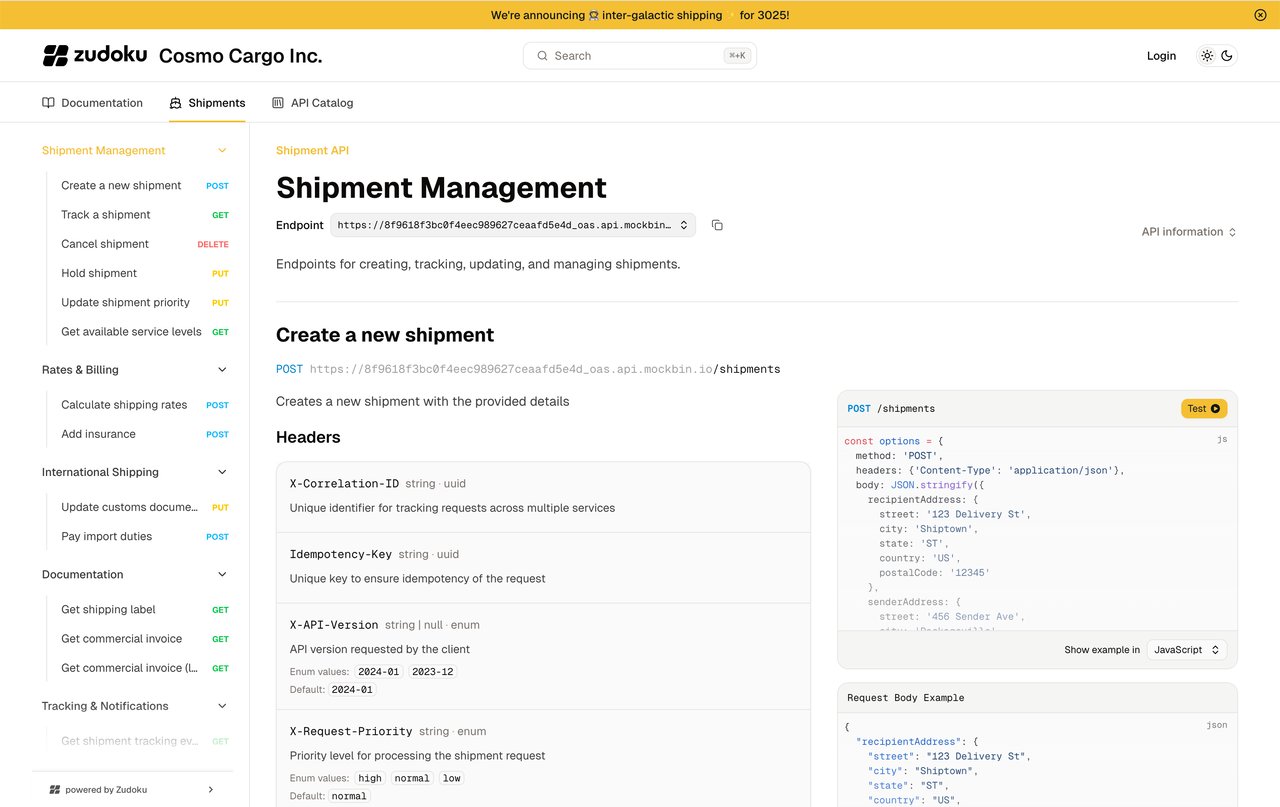
The Zuplo Developer Portal gives your API consumers a place to read documentation, explore your API, and manage their API keys. It combines API reference documentation from your OpenAPI specifications with pages you write in Markdown, MDX, or React.
Zuplo builds, deploys, and hosts the portal. The portal uses Zudoku for content, configuration, and customization.
What you can do
Use the Developer Portal to:
- Generate API reference documentation from your OpenAPI specifications and let readers test requests in the API Explorer.
- Publish guides and custom pages in Markdown, MDX, or React.
- Let consumers manage their keys when you use Zuplo's API key management.
- Show subscription quota usage with the monetization usage dashboard.
- Customize the portal's theme, install modules, and use a custom domain.
Core concepts
The portal combines three parts:
| Part | Purpose |
|---|---|
| OpenAPI specifications | Describe the API operations shown in the reference and API Explorer. |
| Documentation pages | Provide guides and other content you write for your API consumers. |
| Configuration file | Set navigation, appearance, authentication, and other portal options. |
You can work on the portal locally to
preview content and configuration changes before deployment. Zuplo manages
hosting, and you can assign a custom domain
such as docs.example.com.
Take the portal offline
To take a published portal offline, deploy the environment without a portal
configuration file. Delete the docs/zudoku.config.* file (for example
docs/zudoku.config.tsx) from the project and deploy it again.
When a deploy has no portal configuration and a previous deploy published a portal, Zuplo unpublishes the old portal:
- Your API gateway keeps running. Only the portal goes offline.
- The portal's hostnames, including any
custom domain assigned to the portal, return
a
404. - The build output lists the hostnames that it unpublished, for example
Unpublished the previous developer portal from https://my-project-main-abc123.zuplo.site.
If Zuplo can't unpublish the portal, the build output shows a warning and the gateway deploy still succeeds. Deploy again to retry.
Each environment has its own portal, so deploy the change to every environment
whose portal you want to take offline. To bring the portal back, add the
docs/zudoku.config.* file again and deploy.
Next steps
- Build your first developer portal in the Zuplo Portal, then test an authenticated API request.
- Review the configuration file to set up your portal's content and navigation.
- Add a custom domain for your published portal.
For help with your developer portal, contact support@zuplo.com.