

Test GitHub deployments
- Applies to
- Gatewayruntime for API, AI, and MCP gateways
- Hosting
- Managed EdgeManaged DedicatedSelf-Hosted
Run your test suite automatically after every Zuplo deployment without replacing
the built-in GitHub integration. This approach uses GitHub's deployment_status
event to trigger tests after Zuplo finishes deploying, and makes the result a
required status check so a gateway regression blocks the merge.
Why trigger on deployment_status
Zuplo's GitHub integration handles deployments — every push deploys automatically with status checks in GitHub. Rather than replacing this with custom CI/CD, extend it by running tests after each deployment completes.
This gives you:
- Automatic deployments — keep the built-in integration
- Post-deploy testing — run tests against the live environment
- PR checks — tests block merging until they pass
- No duplicate deploys — tests run after Zuplo deploys, not instead of
Set up the workflow
Create a workflow that triggers on the deployment_status event:
.github/workflows/test.yaml
The workflow reads the deployment URL once into API_URL and reuses it, so the
readiness check and the test run target the same environment.
Poll for readiness, never sleep
deployment_status fires when the deployment is accepted, which can be
shortly before the environment is warm. A fixed sleep is a guess that is wrong
in both directions — flaky when the system is slow, wasted CI minutes when it is
fast. Tests fired into that gap fail, get retried, and the pipeline race gets
misfiled as flaky tests.
If your gateway has no unauthenticated health route, add one. See health checks.
How it works
- You push code to GitHub.
- Zuplo's integration deploys automatically.
- Zuplo reports deployment status back to GitHub.
- The
deployment_statusevent triggers your workflow. - The workflow polls the deployment until it answers.
- Your tests run against the deployed environment URL.
- Test results appear as a check on the commit or pull request.
The environment_url from the deployment status contains your Zuplo environment
URL, so tests always run against the correct environment.
Pass fixture credentials
Tests that exercise authenticated routes need fixture tokens or API keys. Keep
them in GitHub Actions secrets and pass them as environment variables. Inside
the test they are available on TestHelper.environment:
Code
API key buckets and rate limit state are per environment, so the credentials must belong to the environment being tested. See testing preview environments.
Filter by environment
To test specific environments only, such as staging or production:
Code
Against production, run only the read-only smoke subset rather than the whole suite:
Code
Add to PR checks
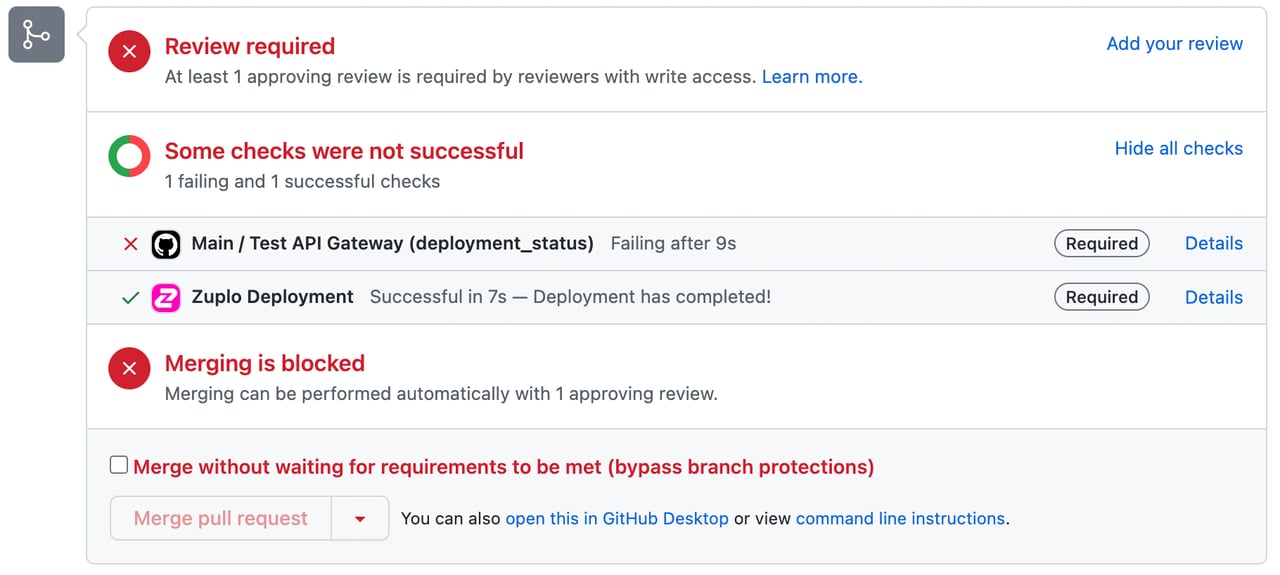
GitHub automatically shows deployment status checks on pull requests. Your test workflow results appear alongside them, giving reviewers confidence that both deployment and tests succeeded.
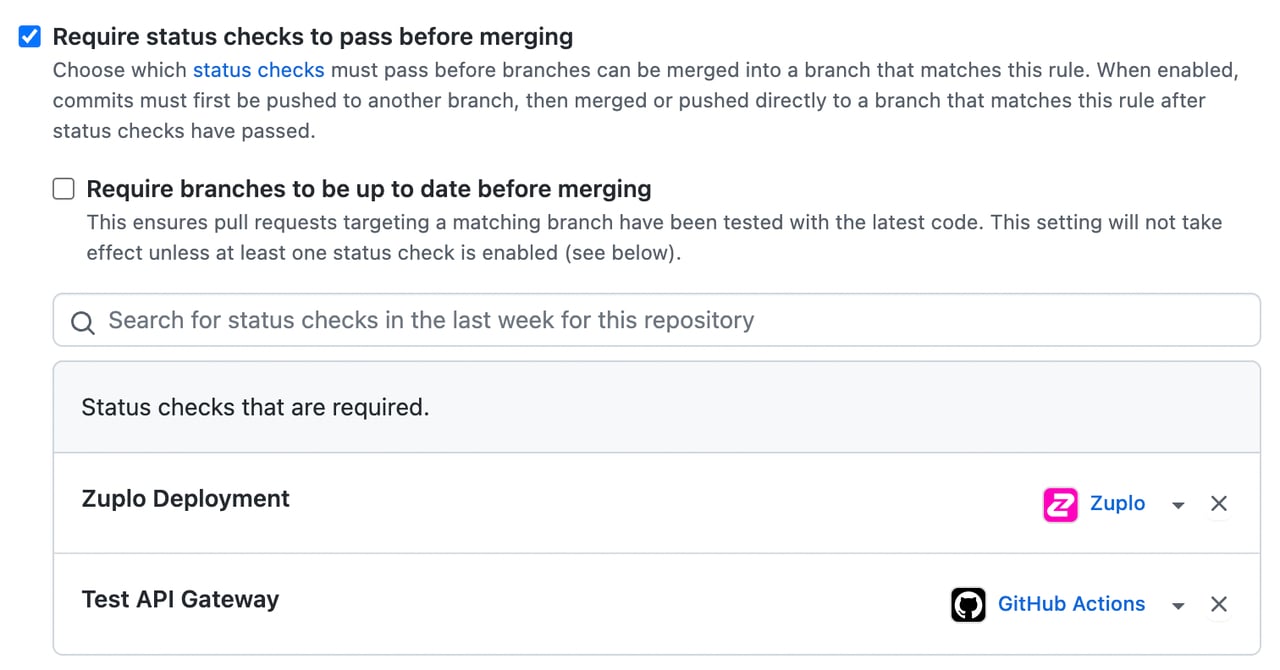
To make the check blocking, add the workflow's job name to branch protection as a required status check. The example below marks both "Zuplo Deployment" and "Test API Gateway" as required.
A developer who tries to merge before the tests pass sees the merge blocked.
Do not add a blanket retry to the test job. If a test needs a rerun to pass, it has a shared resource, a sleep, or the pipeline is reporting readiness before the gateway is serving. A retry converts a debuggable signal into permanent background noise. See gateway test recipes for the determinism rules.
When to use custom CI/CD
This approach works well when you want to:
- Keep automatic deployments
- Run tests after deploy
- Add PR checks
Consider custom GitHub Actions if you need:
- Approval gates before production
- Multi-stage deployments (staging then production)
- Tests that must pass before any deployment
- Tag-based or release-based deployments