

Advanced Path Matching
By default, path matching in Zuplo uses the OpenAPI slug format, for example
/pizza/{size} where size would be a URL parameter, with the value passed
into the runtime as request.params.size property.
However, you can opt to use a more advanced path matching approach based on the web standard URLPattern.
In order to use URLPattern matching you must set your route's
x-zuplo-path.pathMode to url-pattern.
The URLPattern matching mode can be set in the UI as shown below:
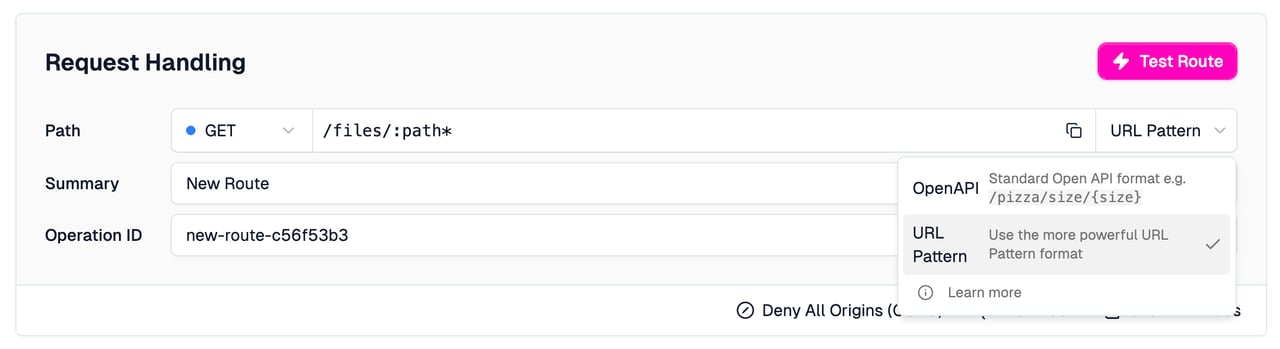
Alternatively, you can set it in your OpenAPI file as follows:
config/routes.oas.json
The most basic path is / which will simple match the root path. You can add
other static paths like /foo and /foo/bar
Use URLPattern.com to test your URL Patterns in the browser.
Trailing Slashes
In URLPattern, trailing slashes aren't accepted unless explicitly specified. For example:
/cars/:manufacturer
Would match /cars/ford but not /cars/ford/. If you want to support this you
must add a little regex to the end of your path, for example -
/cars/:manufacturer{/}?
Will match both example routes given above.
Dynamic Paths
URLPattern supports dynamic matching including a feature that will parameterize parts of the URL. For example:
Path: /products/:productId/sizes/:size will match the following paths
/products/pizza/size/small and set the params object on request to:
Code
Query-strings (or search parameters) won't affect path matching.
Regular Expressions and Wildcards
You can also use regular expressions in your paths. They must be contained in
().
Examples
Path /(.*) will match anything.
This is a true wildcard route and can be used for custom 404s by making this the last route in your OpenAPI file (and matching all methods).
Path /(a?b) will match either /ab or /b.
Path /main/(a|b) will match /main/a or /main/b.
Path /icon-(\d++).png will match /icon-1234.png or any other series of
digits for 1234.
Named groups
You can also name your regexp groups so that they appear as named parameters.
name:(.*) - will match a wildcard and call the parameter.
For example, the path products/:productId/icons/icon-:imageIndex(\d+).png will
match /products/pizza/icons/icon-2.png and produce a request.params object
as follows:
Code
You can write a URL Rewrite that takes an
incoming wildcard and appends it to the backend request, for example Path:
/foo/bar:path(/.*) Incoming URL: /foo/bar/apple/banana URL Rewrite Pattern:
https://example.com/x${params.path} Outgoing URL:
https://example.com/x/apple/banana
Not supported
Note that not all regex features are available, us of the following will either be ignored or result in an error, including
(?:...)- named matches^or$- start or end of string[abc]- character classes