

Connect an agent to the Stripe MCP server and it can read your customers. It can
also issue refunds. The server hands a client its whole tool surface at once, so
create_refund sits in the same list as fetch_stripe_resources with nothing
between them but the model’s judgment. One bad inference, one prompt-injected
instruction in a support ticket, and a read task becomes a write you did not
authorize.
The full tool surface is the default. You opt out of the dangerous half, not into the safe one, and most teams never opt out.
- Pointing agents at a third-party MCP server like Stripe, Linear, or GitHub
- Fronting an upstream that ships write and delete tools beside its read tools
- Building a "read-only" connection you can actually prove is read-only
- Happier blocking a destructive tool than trusting a model not to call it
The default tool surface is the blast radius
An MCP server advertises its tools through tools/list, and a client takes the
whole list. The protocol leaves consent to the client and has
no notion of a safe subset.
The Stripe MCP server is a clean example.
Alongside read tools like stripe_api_read, search_stripe_resources, and
get_stripe_account_info it exposes create_refund and a general-purpose
stripe_api_write that covers every POST, PATCH, PUT, and DELETE the Stripe API
offers.
Hand that server to an agent unmodified and the agent’s blast radius is the upstream’s entire capability set. The model decides which tool to call, and the model is the part of the system you control least. Narrowing what it can reach is not a tuning knob, it is the boundary.
Filter capabilities with an allowlist, not a denylist
The Zuplo MCP Gateway fronts an upstream
MCP server with a virtual server of your own, and the
mcp-capability-filter-inbound policy decides which of the upstream’s
capabilities survive the crossing. It works as an allowlist:
- Omit a capability type entirely and everything of that type passes through unchanged.
- Name specific entries and only those are exposed.
- Pass an empty array and every capability of that type is hidden.
The filter covers tools, prompts, resources, and resource templates, matched by exact name or URI. No regex, no glob: the set you write is the set you get, with no pattern quietly widening the allowlist later.
Common mistake:
A denylist is the trap here. List the dangerous tools to block and every tool the upstream adds tomorrow is exposed by default, including the next destructive one. An allowlist fails closed: a new upstream tool stays hidden until you add it on purpose.
Build a read-only Stripe MCP server
In the portal, add a route and pick MCP Gateway Virtual Server, then point it at the Stripe MCP server. The wizard wires the inbound OAuth and a Stripe token exchange for you, one-time setup covered in fronting a third-party server and binding MCP tokens to one server.
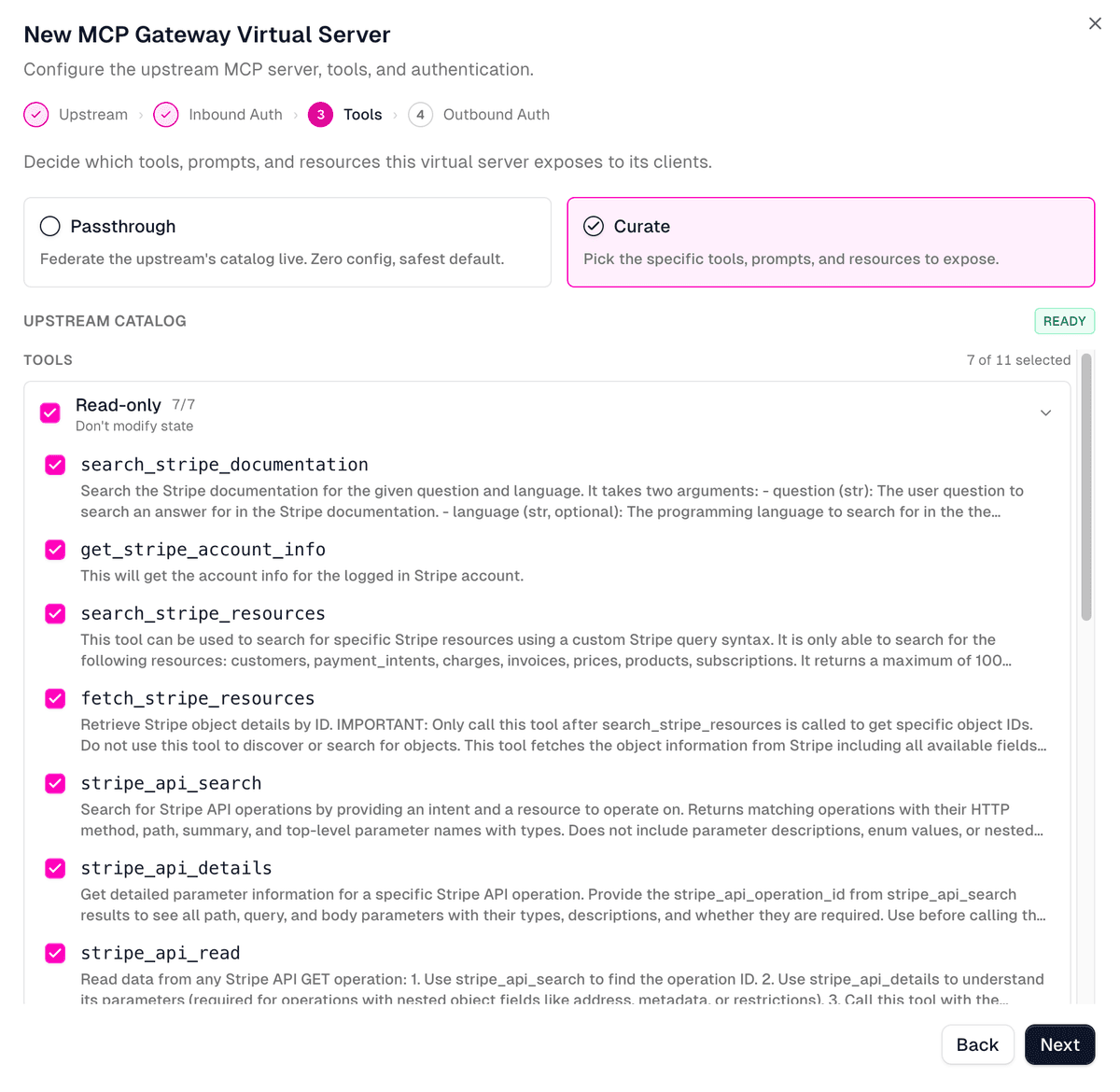
At the wizard’s Tools step, choose Curate instead of Passthrough, sign in to Stripe, and check the Read-only group, leaving every write tool unselected. That is the whole curation: a column of checkboxes, nothing typed by hand.
The Stripe sign-in is its own enforcement layer, and it comes before the gateway sees a single tool. Stripe’s OAuth consent screen presents the scopes you are granting and lets you narrow them there, so you can hand the gateway a connection that is already restricted at the source. The allowlist then narrows again on top of that: the upstream token is scoped at Stripe, and the tool surface is scoped at the gateway. Two independent cuts, neither relying on the other.
The gateway writes your choice to git-backed config as an
mcp-capability-filter-inbound policy and attaches it to the route. For a
security reader the generated artifact matters more than the clicks, because it
is the thing you review in a pull request:
The Read-only group holds seven tools. Check that group and leave the rest, and
the agent gets exactly those seven. create_refund and stripe_api_write are
among the four you left unchecked, so they are gone: not hidden in the UI, not
discouraged in a description, gone from tools/list and unreachable by name.
| Stripe MCP tool | What it does | On this server |
|---|---|---|
stripe_api_read |
Read data from any Stripe GET | Exposed |
stripe_api_search |
Find Stripe API operations by intent | Exposed |
stripe_api_details |
Get parameters for an API operation | Exposed |
search_stripe_resources |
Search Stripe resources with a query | Exposed |
fetch_stripe_resources |
Fetch a specific Stripe object by ID | Exposed |
get_stripe_account_info |
Read the connected account’s details | Exposed |
search_stripe_documentation |
Search the Stripe documentation | Exposed |
stripe_api_write |
Any POST, PATCH, PUT, or DELETE | Blocked |
create_refund |
Issue a refund | Blocked |
An agent connecting to /mcp/stripe-readonly sees the seven exposed tools and
no way to move money.
The filter is exactly as granular as the tools the upstream defines. Stripe
splits reads and writes into separate tools, stripe_api_read against
stripe_api_write, so a clean read-only cut is possible. An upstream that
bundles both into one tool forces a coarser call: expose it or don’t. Check how
an upstream draws those lines before you promise anyone read-only.
MCP capability filtering
The full model: how the allowlist matches tools, prompts, resources, and resource templates, and how projections override what the client sees.
Prove the destructive tool is unreachable
A read-only claim you cannot demonstrate is a comment, not a control. Connect
the route in an
MCP inspector: set the
transport to Streamable HTTP, paste the gateway URL, and connect through the
OAuth flow. The screenshots here use MCPJam; the official MCP Inspector behaves
the same. tools/list returns exactly the seven allowlisted tools, and
create_refund is not among them.
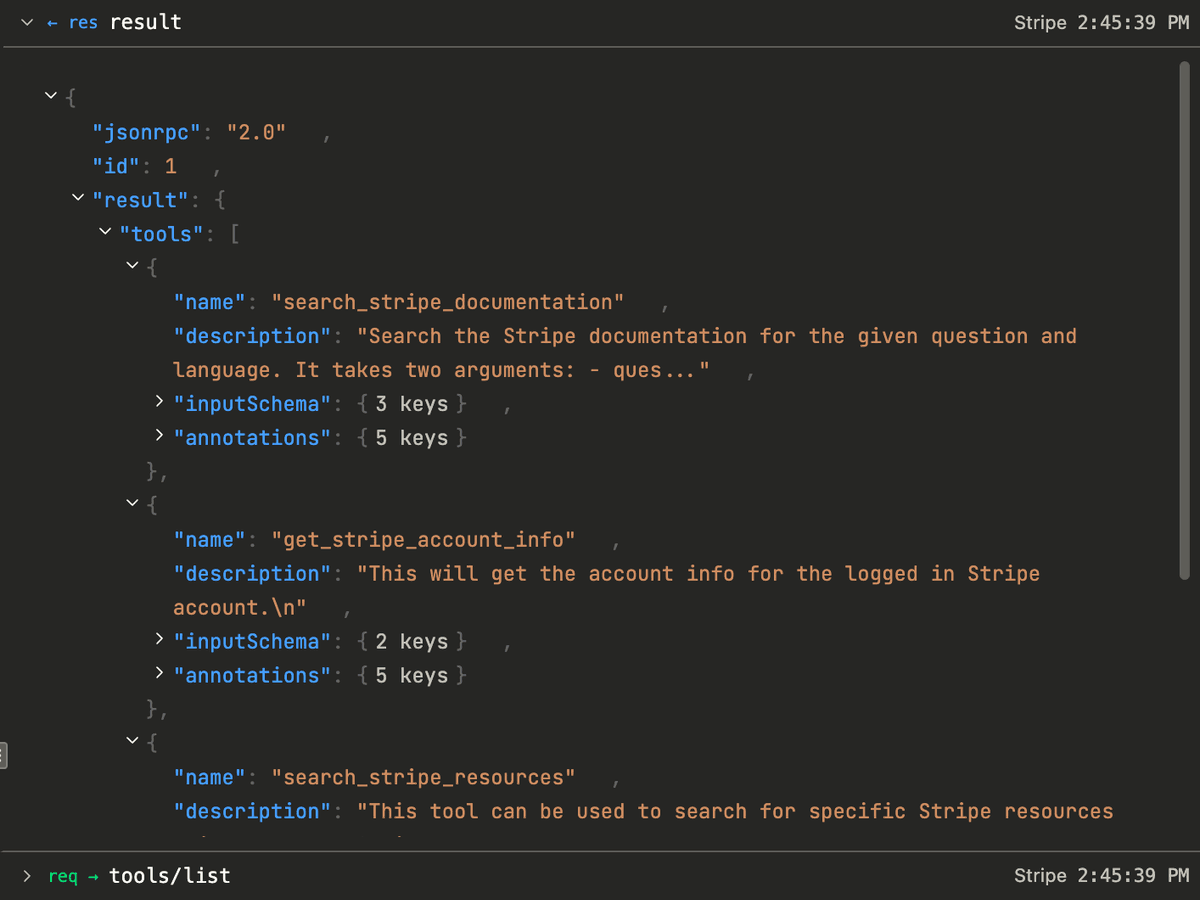
Then bypass the list and call the filtered tool directly by name, the move a confused or steered agent would make:
The gateway rejects it before anything reaches Stripe:
That is JSON-RPC error -32601, the same response the client would get for a
tool that never existed. The filtered tool is indistinguishable from a
nonexistent one, so a cached or guessed name buys an attacker nothing. The
refund call dies at the gateway, and the Stripe API never sees it.

Narrow the descriptions agents see
The Curate checkboxes get you the allowlist. The one thing they cannot do is change how a tool describes itself, so this is the step where you open the generated policy and edit it directly. Replace a plain string entry with an object and you override the description and annotations the upstream ships, while the upstream name stays the match key:
The override is deep-merged, so the fields you set win and everything else
passes through from upstream. A tighter description steers the model toward the
narrow use you intend, and readOnlyHint advertises that the tool does not
mutate state. That hint is advisory, a client is free to ignore it, so neither
is a security control on its own: the allowlist enforces the boundary. But a
tool the agent understands narrowly is a tool it misuses less.
A blocked call is a signal, not silence
The rejection is not just a dead end for the caller, it is information for you.
Because the gateway returns the -32601, the attempt to call create_refund is
a request it sees and logs like any other, attributed to the authenticated
subject through the OAuth flow. The gateway emits structured mcp_* events
carrying the route, the upstream, and the subjectId of the caller, surfaced in
the gateway’s logs and analytics.
So a blocked call is a question worth asking: which identity tried to refund a charge through a connection you scoped to reads only? On most setups that signal is lost, because the agent talks to the upstream directly with no choke point to record the attempt. Routing through the gateway turns a quiet failure into an audit trail, the same per-call visibility we covered in exposing internal APIs as governed MCP tools.
Blast radius is a design choice
The capability filter is small, but the property it buys is not. A virtual server scoped to seven read tools cannot issue a refund no matter how the model is prompted, because the tool that issues refunds does not exist on that route. That is a deterministic guarantee, not a detection rate, and it sits beside the other boundaries the gateway draws: tokens bound to one server so a leaked credential cannot roam, and governance over shadow MCP so the connections exist where you can see them.
We run our own agents’ access to third-party servers through virtual servers
scoped this way, so an agent reaching for a tool we never exposed finds a
-32601 instead of a live endpoint. Decide the blast radius when you stand up
the server, not after an agent has found the edge of it.
Put a read-only virtual server in front of your first upstream
The Zuplo MCP Gateway fronts any upstream MCP server, allowlists the tools you trust, and returns Method not found for everything else. No code to write the boundary.
- Allowlist tools, prompts, and resources
- Git-backed, reviewable policy
- Per-call logs and attribution