

Your agents talk to the Stripe MCP server, Linear, GitHub, an internal server a teammate stood up last week. Ask which tools they called yesterday, under which identity, and whether any of those calls failed, and on a direct connection the honest answer is nothing. The agent talks straight to the upstream, and the only record is whatever that upstream chooses to keep, in a console you do not control.
For a security review, “the Stripe integration did it” is not an answer. You need the tool, the caller, the time, and the result, for every call.
- Running agents against third-party MCP servers like Stripe, Linear, or GitHub
- Asked by security or compliance to show what your agents actually called
- Trying to attribute a tool call to a real identity, not a shared service credential
Direct connections leave no trail
When an agent connects straight to an MCP server, the tool calls cross a
boundary you have no view into. The server returns its tools through
tools/list, the agent picks one, the call runs, and none of it is attributed
to a caller you can name on your side. If the upstream logs anything, it logs
the shared credential the integration authenticates with, not the person or
agent that triggered the call. The trail stops at the server’s edge, which
belongs to someone else.
Route through a gateway
The Zuplo MCP Gateway fronts an upstream MCP server with a virtual server of your own: a gateway-side endpoint that maps to one upstream and is what your agents connect to instead of reaching the upstream directly. Every request the agent makes crosses the gateway, so the gateway sees and records each one.
This is the same choke point that lets you allowlist the tools you trust and bind tokens to one server. Once traffic flows through a point you own, that point can write down what happened.
The gateway emits structured events for the moments that matter, grouped into three families:
| Event family | What it captures |
|---|---|
mcp_request |
The route boundary: whether the gateway accepted or rejected a request |
capability_invocation |
The actual tool, prompt, and resource calls and their results |
auth_event |
The OAuth lifecycle, from token issued to token validated |
Each tool call your agent makes is a capability_invocation. That is the record
the rest of this post is about.
Every tool call in one dashboard
In the portal, open Observability, then Analytics, then the MCP tab. At the account level it aggregates across every project with MCP routes; inside a single project it scopes to that project. The MCP section appears once the first MCP request is recorded, so there is nothing to switch on.
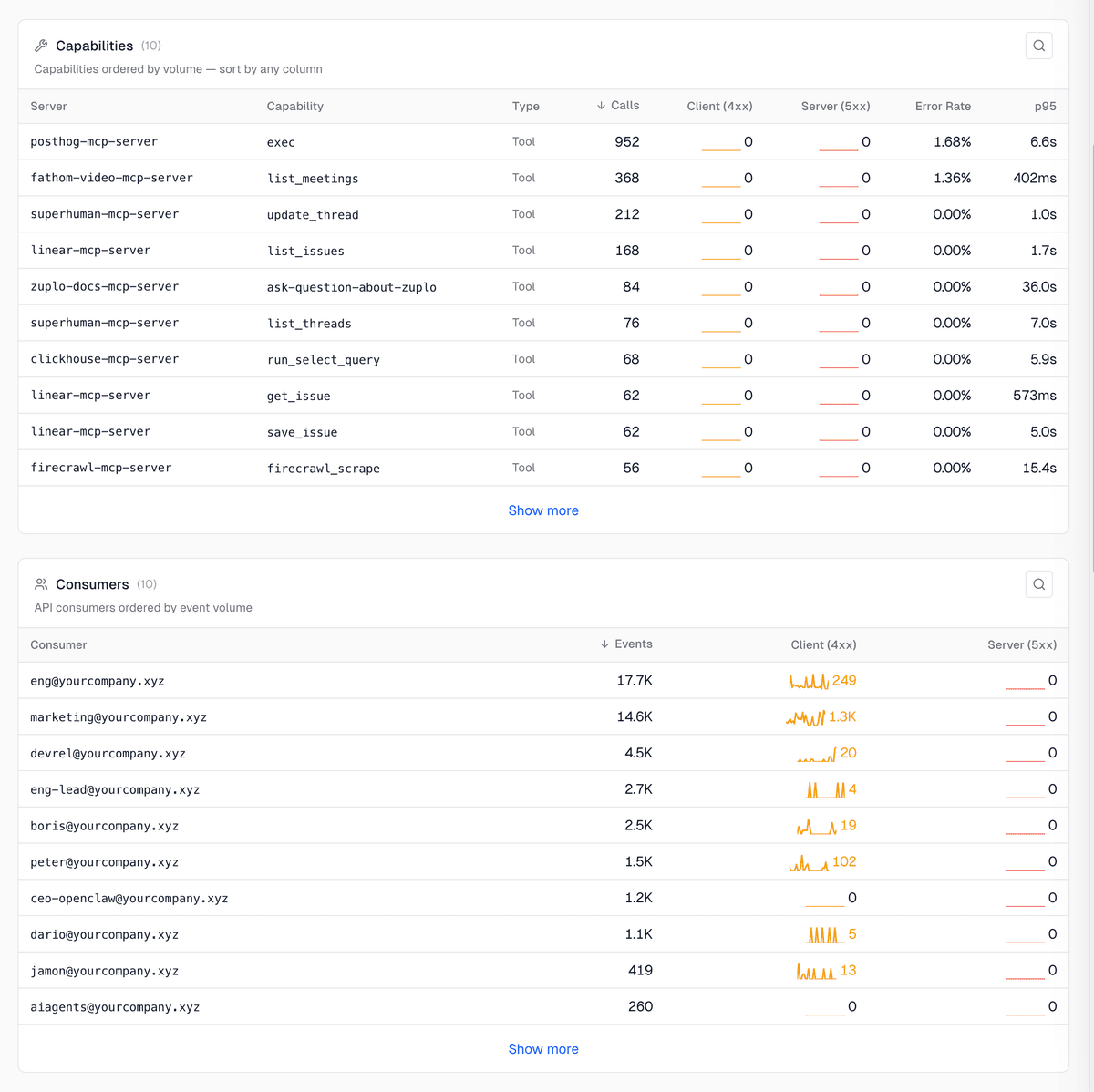
The dashboard reads as a set of panels, each answering one question:
| Panel | Question it answers |
|---|---|
| Capabilities | Which tools, prompts, and resources get called the most, fail the most, and run the slowest |
| Consumers | Which identities are driving the calls |
| MCP Methods | Which MCP methods are in play: tools/call, tools/list, resources/read |
| Clients | Which client apps are connecting, by name and kind |
| Failure Origins | Whether a failure came from the gateway, the upstream, or the client |
| JSON-RPC Error Codes / Reason Codes | The exact error and reason codes behind the failed calls |
Capabilities is the per-tool view, sortable by any column, with a Type column separating tools from prompts and resources. It is the direct answer to “which tools did our agents call, and how often.”
Who made the call
The dashboard is useful because the underlying records carry identity. Three fields land on every entry:
operationId, the route the call hit.upstreamServerId, the upstream the call was bound for, shown in the Server column of the Capabilities panel.subjectId, the authenticated caller, listed in the Consumers panel as an email where one exists.
So “which identity tried to call create_refund” is a question with an answer.
On a direct connection the upstream sees one shared credential for all of it;
through the gateway each call is tied to the subject that
authenticated through the OAuth flow.
That is the difference between a log and an audit trail.
Failures and denials
A call that never succeeds is often the one you most want to see. The gateway
sorts every result into one of seven color-coded outcome classes. The four you
reach for first (the other three cover partial, cancelled, and
connect_required states):
| Outcome | What happened |
|---|---|
success |
The call completed |
denied |
The gateway rejected it at the boundary, before the upstream saw it |
application_error |
The upstream returned an MCP-level error inside a 200 response |
failure |
The call never got a clean response, a transport or operational fault rather than an error the upstream chose to return |
A failureOrigin field then tells you whether the gateway, the upstream, or the
client was the source. So when an agent reaches for a tool you
filtered off the route, the blocked
call is not silence, it is a denied event with the subject attached, and you
can ask who tried it.
Send the logs to your SIEM
The dashboard is the fast read. For retention and compliance you want the events in the system you already audit against, and the same MCP events feed Zuplo’s standard logging pipeline: Datadog, Splunk, AWS CloudWatch, Google Cloud Logging, New Relic, Sumo Logic, Loki, Dynatrace, and VMware Log Insight, plus OpenTelemetry for traces and logs in OTLP format.
The OAuth lifecycle events are recorded as audit entries, at info severity,
for compliance review. The gateway is deliberate about what it leaves out:
bearer tokens, authorization codes, client secrets, and customer request bodies
are never written to a log entry, so shipping the audit trail to a third party
does not ship your secrets with it.
MCP Gateway analytics
The full panel reference: every event family, the dimensions you can group by, and the outcome classes the dashboard reports.
Decide visibility up front
We run our own agents’ access to third-party servers through virtual servers. The first thing the dashboard told us was which tools the agents actually lean on, which is rarely the list you would guess. The audit trail is a byproduct of routing through a point you own, the same point that governs shadow MCP connections and scopes what each agent can reach. You do not bolt logging on afterward. You get it the moment the traffic stops going direct.
Get an audit trail for your agents' MCP tool calls
The Zuplo MCP Gateway fronts any upstream MCP server and records every tool call, attributed to an identity, in the analytics dashboard and your existing log sinks.
- Per-tool-call analytics in the portal
- Every call attributed to a subject
- Ships to Datadog, Splunk, OpenTelemetry, and more