

Plenty of useful MCP servers authenticate one way: a static token you paste into
every client config. The token is usually powerful, it sits in plain text
wherever the client keeps its connectors, and it carries no per-user identity or
revocation story. Tinybird’s MCP server works this way. It speaks Streamable
HTTP and takes its token as a query parameter (?token=), with no OAuth option
at all.
The Zuplo MCP Gateway fronts any MCP server whose only upstream auth is a static API key or token. It presents OAuth 2.1 to clients against your own identity provider and supplies the static credential upstream, so the key never reaches the client. I’ll use Tinybird as the worked example, but the same steps apply to any MCP server that uses tokens or API keys as its authentication method.
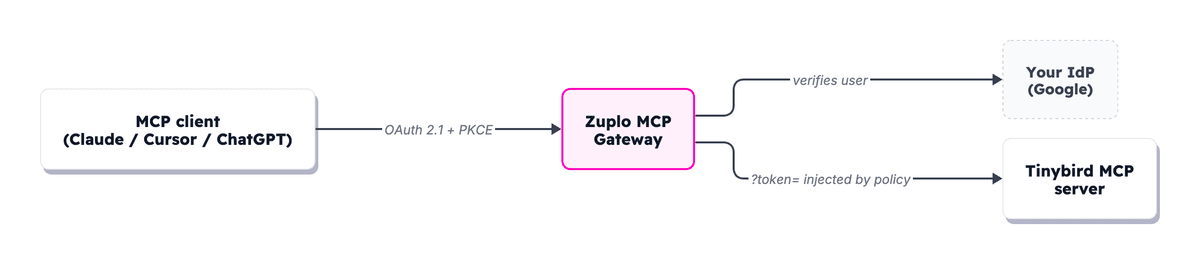
- The upstream MCP server only supports a static API key or token
- You want users to connect through your own identity provider
- You don't want the credential living in client configs
- You need per-user identity or central revocation
Front Tinybird in the portal
Open a Zuplo project, go to the Code tab, click Add Route, and pick MCP Gateway Virtual Server. That route type fronts one upstream MCP server and hands you back a governed Gateway URL.
The wizard opens on a library of known servers. Tinybird isn’t a preset, so
choose the custom MCP server option and set the upstream URL to
https://mcp.tinybird.co. Leave the token out of this URL. It goes in later as
a policy, not baked into the address.
Click Next to set inbound authentication, the layer that gates who connects to the gateway. Pick your identity provider here. I use Google, and Zuplo ships presets for Auth0, Okta, WorkOS, Entra, generic OIDC, and many more. Whichever you pick, clients authenticate against the same login my team already uses. The wizard names the inbound policy and lists the environment variables it needs.
On the Tools step you decide what the gateway exposes downstream.
Passthrough forwards every tool the upstream offers. Curate lets you
tick exactly which ones, and it is worth doing here. Tinybird’s server exposes
discovery tools like list_datasources, list_endpoints, and explore_data,
alongside execute_query and text_to_sql, which run arbitrary SQL against
your workspace.
If your agents only need to read and explore, leave the discovery tools on and
drop execute_query and text_to_sql so nothing can run SQL you didn’t intend.
A tool the gateway doesn’t expose can’t be called, so curation is a hard
boundary, not a hint. Finish the wizard and Save.
Inject the static token as a query parameter
The wizard handled the client side. The upstream side, how the gateway reaches
Tinybird, is separate. Tinybird authenticates with a query-string token, not
OAuth and not a header, so the upstream credential is an ordinary Zuplo policy
rather than a wizard toggle. In the route’s policy list, add the Add or Set
Query Parameters policy, set the Name field to set-query-params-inbound,
and give it one token parameter with the value $env(TINYBIRD_TOKEN), which
reads from a Zuplo environment variable at request time. The policy body looks
like this:
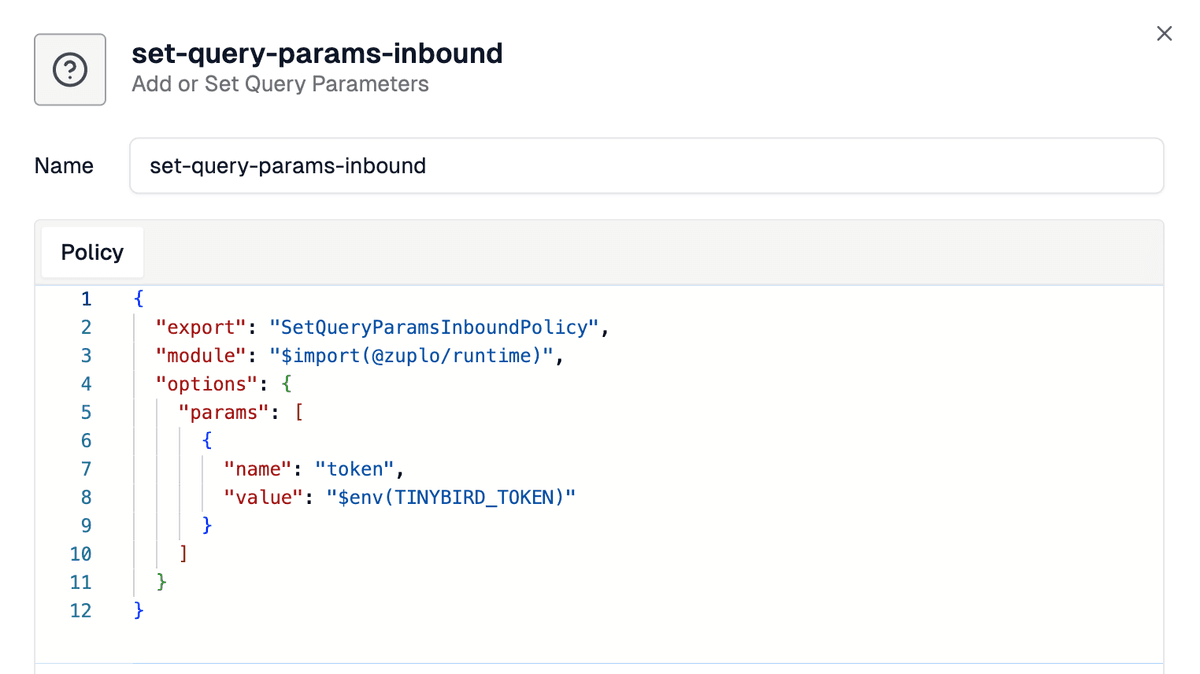
Then go to Settings, Environment Variables, and set TINYBIRD_TOKEN to
a token you generate in Tinybird. Use a
resource-scoped token or a JWT,
not an admin token, so least privilege holds even inside the gateway.
The policy sets the value rather than appending, so it overwrites any token a
client tries to send. The first time I wired this up I half-expected a
client-supplied token to slip through, but the overwrite default silently won,
which is exactly the behavior you want here. The secret stays in an environment
variable, out of both the upstream URL and the client.
Connect an upstream that doesn't speak OAuth
Zuplo's guide to composing ordinary policies for non-OAuth upstreams, plus Tinybird's own MCP server docs for token types and scoping.
What the client connects to
Save and deploy, then point an MCP client at the route URL. That URL is your
gateway’s base hostname plus the path you set in the wizard, like
https://mcp-gateway-ui-main-76f74a7.d2.zuplo.dev/mcp/tinybird.
When I connect Claude to mine, it sees a normal OAuth connector. It identifies itself automatically (Claude uses Client ID Metadata Documents, older clients fall back to Dynamic Client Registration), so there’s no app to set up by hand, runs the PKCE handshake against your identity provider, and asks the user to approve once.
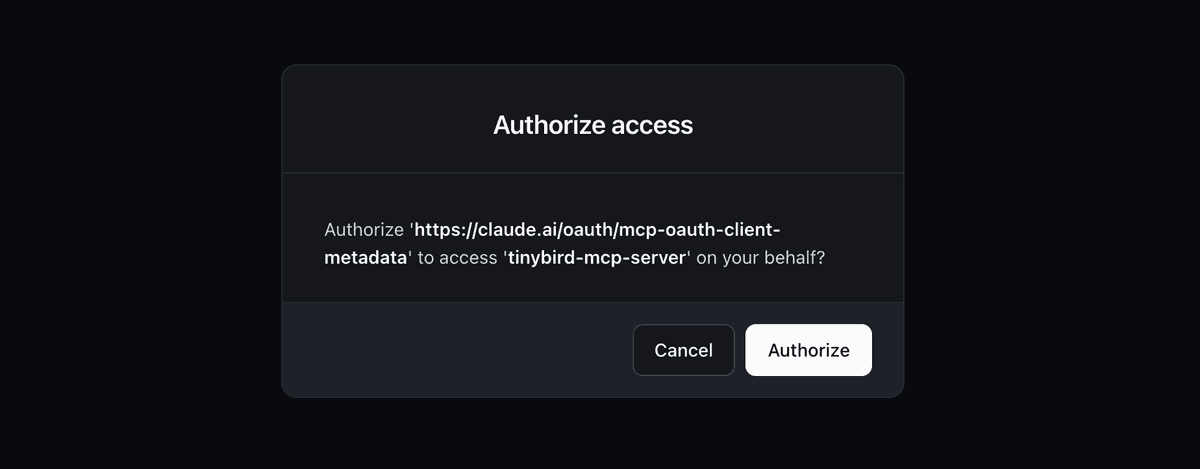
No token is pasted anywhere, and revoking a person’s access is a change in your IdP, not a token rotation across every machine that holds it. Once it’s connected, Claude lists the Tinybird tools served through the gateway.
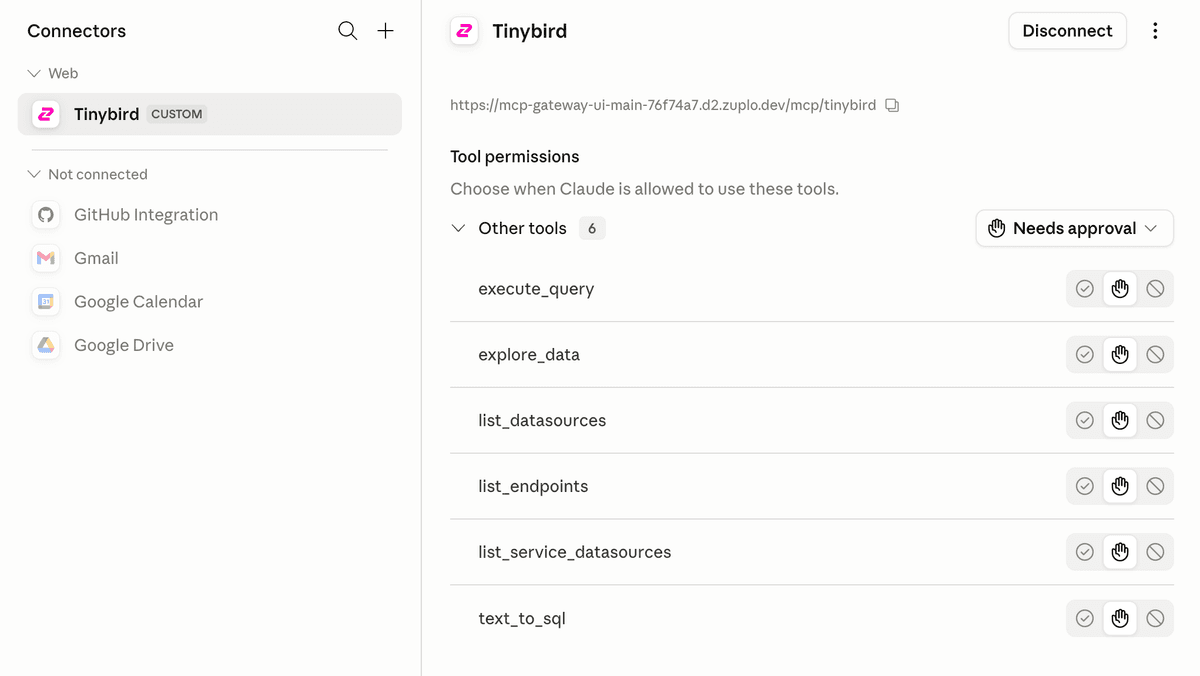
That hostname is my Working Copy, Zuplo’s development environment, where saves deploy instantly while you test the connect flow. It’s not where production agents should point. Before you hand the URL to other users, deploy to production from source control and put the gateway on a custom domain, so the URL you give clients is one of yours rather than a generated dev hostname.
Zuplo environments
How Working Copy, preview, and production environments differ, and how source control and a custom domain shape the URL you hand to clients.
Why the token never leaks
The differentiated part is not tool filtering or auth translation, which most gateways now do. It is two things.
First, you wrapped a server that has no OAuth at all. Tinybird offers a static token and nothing else, and the gateway turns that into a standards-based connect flow without Tinybird changing anything.
Second, the credential the gateway issues is bound to this one route. The gateway treats each virtual server as its own OAuth resource, so the access token a client holds is only valid at the route it was issued for. A token minted for your Tinybird route can’t be replayed against any other route or upstream.
The Tinybird token itself stays scoped by the JWT or resource-scoped token you chose, so least privilege holds upstream too. You can also lean on the gateway’s per-tool, per-user analytics to watch the SQL agents run, exactly what Tinybird recommends.
This is just a Zuplo route, so the rest of the policy library composes on top: rate limits, request validation, logging. The same pattern fronts any token-only server you need to expose, the way we front Linear, Stripe, and Notion internally.
The MCP Gateway is in public beta on every plan, the free tier included. Spin up a free Zuplo project and wrap your first token-only server today.